In this dialog, you assign the systems or media to the system classes. After confirming the dialog, the data for the system pipes is written to the pipe routes.
You are here
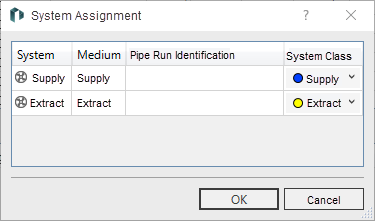
System Assignment
|
Element |
Meaning |
|---|---|
|
System |
Indicates the system, for example, supply air, extract air, or cold water. |
|
Medium |
Displays the media assigned to the system. |
|
Pipe Route Identification |
Displays any pipe route identification that may be available. The pipe route identification is used to differentiate between system classes when pipe routes contain multiple media pipes of the same type. When using pipe route identifiers, the identifiers on the feed-in and transfer sides must be identical. |
|
System Class |
Displays the system class assigned to the system. |