-
Open the Feed and Transfer area.
-
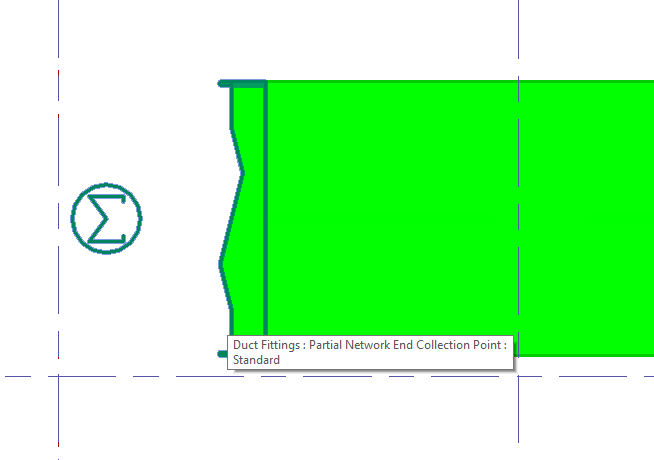
Place a collection point (Partial Network End) at the end of a pipe route in a room. The end of the route can be located anywhere near the rooms to be supplied.
-
Switch to the Analyse tab and select System Assignment....
-
Select the collection point in the model.
The Transfer Point dialog opens.
-
Enter a Name for the transfer point.
-
Click
 New Entry to select the systems for the supply of the room through the collection point.
 -
In the upper area of the dialog, select the system for which you want to define the rooms to be supplied using an area filter.
-
In the lower section of the dialog, click
New Entry to select the parameter that also defines the rooms to be supplied via the collection point.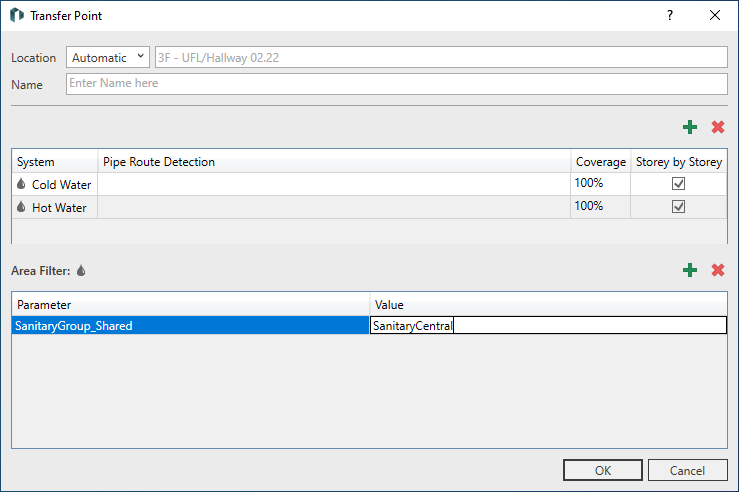
-
Assign the value that this parameter also has in the rooms to be supplied to the selected parameter.
-
Perform the above steps for all systems in your model.
-
Close the dialog with OK.
You have connected several MEP rooms in your model using a parameter via a collection point and you have determined the systems that supply the rooms.