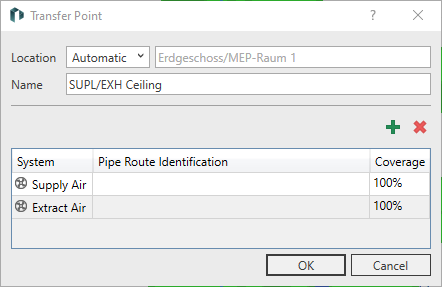
This dialog provides information about the transfer point of a pipe route system currently selected in the model. At transfer points, you define the system classes that are transferred to a space. Transfer points must end in an MEP space. For each transfer point, you can specify the coverage of space requirements using the corresponding systems, for example, heating at 100% and cooling at 50%.
You are here
Transfer Points
Location (Dropdown List): When Automatically is selected, the space in which the transfer point is located is supplied. If a pipe route ends in the floor or in a suspended ceiling, this drop-down list can be used to select whether the space above or below the transfer point is to be supplied.
Location (Name): Displays the name of the space to be supplied.
Name: Displays the name of the transfer point.
System Class
 New Entry: Opens a context menu where you can add a new system class to the transfer point.
 Remove Entry: Deletes the system class currently selected in the list from the transfer point.
|
Element |
Meaning |
|---|---|
|
System |
Displays the system contained in the transfer point. |
|
Pipe Route Identification |
Provides the option to enter a pipe route identifier. The pipe route identifier is used to differentiate between system classes when pipe routes contain multiple media pipes of the same type. The identifiers must either be empty or match on the feed-in/transfer side. |
|
Coverage |
Indicates the percentage of the space's requirements that are met. |