This dialog provides information about the collection point of a pipe route system currently selected in the model. A collection point represents the supply of multiple spaces. Instead of creating individual transfer points for spaces in the model, spaces are assigned to the collection point via parameters, thereby aggregating the requirements. In the dialog, you can define the system classes for which this collection point provides supply and select parameters that identify the spaces supplied via the collection point.
A collection point controls spaces based on structural parameters, for example, all spaces with the property WC Core (parameter) = WC West (value) or all spaces on the ground floor with the property HVAC System (parameter) = HVAC Extension (value). This allows you to visualize systems that are not directly connected to a supply pipe route. In addition, this allows riser zones in shafts to be dimensioned at an early stage without planning the specific horizontal distribution.
You are here
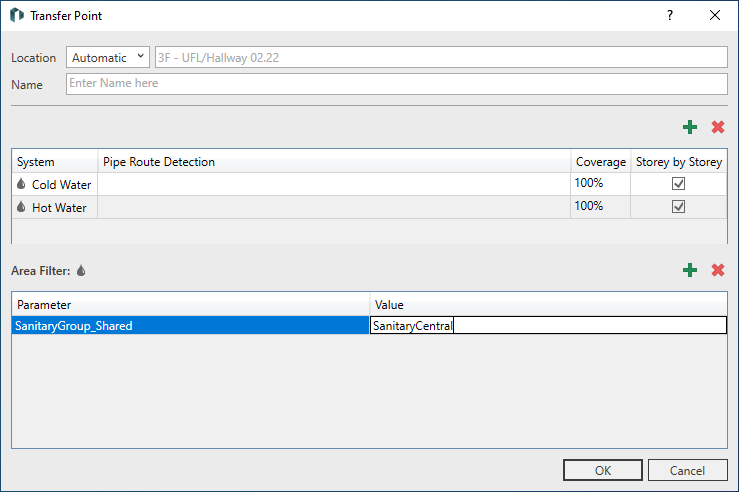
Collection Point
Location (Dropdown List): The spaces to which the defined parameter with the corresponding value is assigned in the collection point are supplied when Automatic is selected.
Location (Name): Shows the area of the model where the collection point is located.
Name: Shows the name of the Collection Point.
System Class
 New Entry: Opens a context menu where you can add a new system class to the collection point.
 Remove Entry: Deletes the system class currently selected in the list from the collection point.
|
Element |
Meaning |
|---|---|
|
System |
Displays the system classes contained in the collection point. |
|
Pipe Route Identification |
Provides the option to enter a pipe route identifier. The pipe route identifier is used to differentiate between system classes when pipe routes contain multiple media pipes of the same type. The identifiers must either be empty or match on the feed-in/transfer side. |
|
Coverage |
Indicates the percentage of demand covered by the spaces connected via the collection point. |
|
Across Storeys |
Specifies whether spaces from other storeys with the same parameter and parameter value are also included in the calculation via the collection point. |
Area Filter (System)
New Entry: Opens the Select Parameter dialog where you can select another parameter for an area filter. Spaces that have this parameter with the same parameter value are supplied via a single collection point without the spaces having to be connected individually.
Remove Entry: Deletes the parameter selected in the table.
|
Element |
Meaning |
|---|---|
|
Parameter |
Specifies the name of the parameter used to identify the spaces in the collection point. |
|
Value |
Specifies the value of the parameter. |