You are here:
Pipe Route without Pipes
If a cross section has not yet been assigned to a pipe route or no pipes have been selected, the following buttons are displayed in the properties:
Create New Cross Section ...: Opens the Cross-Section dialog where you can create a new cross section. After clicking OK in the Cross-Section dialog, the pipes and their arrangement, but not the set dimensions of the new cross-section, are assigned to the selected pipe route segment.
 Assign cross section: Opens the Cross-Sections dialog where you can select an existing pipe route cross-section and assign it to the selected pipe route segment by clicking OK. If you have already assigned pipes to the pipe route segment, they will be added to the palette of the assigned cross-section with the entered dimensions. Adding manually assigned pipes to the cross-section can only be carried out in the properties dialog of the corresponding pipe route segment.
Pipes...: Opens the Select Systems dialog to determine systems for the selected pipe route segment. After clicking Apply, the selected systems are listed in the table. If you have selected systems and then click Create New Cross-Section ..., the selected systems are placed in the palette for location.
 Reset Dimensions: Resets the dimensions of the selected pipe route to the values of a predefined cross-section. This button is only active if a cross-section has been assigned to the pipe route segment.
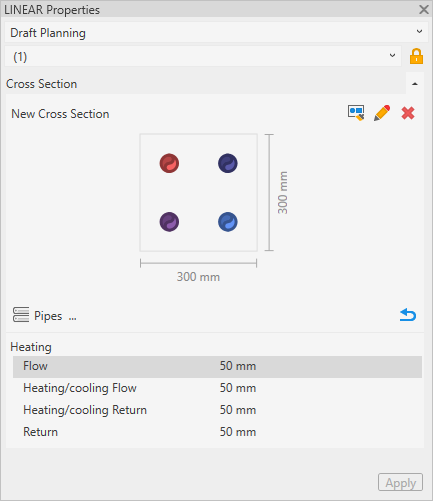
Pipe Route with Pipes
If pipes or a cross section have already been assigned to a pipe route, the following buttons are added:
 Edit Cross Section: Opens the Cross-Section dialog where you can edit the currently assigned cross-section. Only layout modifications are taken into account in the selected pipe route segment. To apply dimension changes as well, click .
 Remove Cross-Section: Removes the currently assigned cross-section from the selected pipe route segment. Manually assigned pipes are maintained.
Pipes
Manually assigned pipes and pipes of assigned cross sections are displayed in the table. The dimension of individual pipes can be adjusted directly in the properties window. This adaptation is only made locally and has no effect on other pipe route segments with the same cross-section. By clicking , the dimensions are reset to the values from the assigned cross-section.