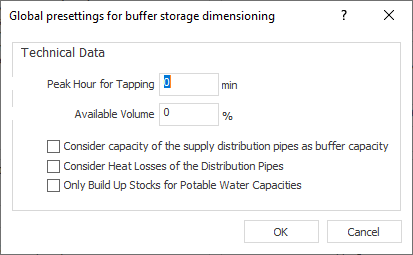
Define global settings for buffer storage dimensioning. The buffer storage is designed according to AGFW520 part 2. The settings are used for the buffer storage, which has to be included in the scheme as a separate component. During calculation, the minimum volume of the buffer storage is determined and transferred to the technical data of the buffer storage.
You are here:
Technical data
Peak hour for tapping: The peak interval for tapping should take at least 10 minutes. The time entered here will act directly proportionally to the size of the dimensioned buffer storage. Double time will lead to a double sized volume.
Available volume: The available volume (thermal usability) of the buffer storage depends on the construction and depends on the position of the temperature sensor and the position of the connections for charging and discharging. If the available volume is only two-thirds, it will lead to a one third bigger buffer size.
Consider supply distribution pipes as buffer capacity
(Supply distribution pipes: Pipes leading from the buffer storage to the heat interface units)
Enabled: The volume of the supply pipes is considered as an additional buffer storage capacity. This will lead to a larger buffer storage volume.
Consider heat losses of the distribution pipes.
Enabled: The buffer storage volume is calculated slightly larger in order to compensate the heat losses of the distribution pipes.
Only build up stocks for potable water capacities
Enabled: The heat of the buffer storage is only used for potable water heating and not for heating the apartments.
Disabled: The heat of the buffer storage is used for both potable water heating and for heating the apartments. This will lead to a significantly larger buffer storage volume.