You are here:
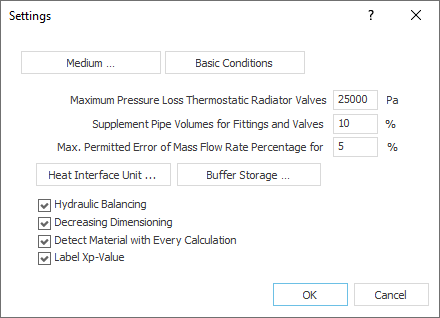
Medium...: Opens the Medium dialog where you can view and adjust the material values of the medium used.
Basic Conditions...: Opens the dialog Basic Conditions, which allows you to change basic calculation-parameters like specifications for hydraulic balancing, upper limits for max. velocities, max. pipe friction pressure gradient as well as settings for the dimensioning of thermostatic valves, regulating valves and differential pressure closed-loop controllers.
Maximum Pressure Loss Thermostatic Radiator Valves
Determine the limit after which a note will should appear during the calculation.
Supplement Pipe Volumes for Fittings and Valves
Specifies the additional fluid volume of the fittings and valves for the calculation. The proposed value is 10% of the pipe volume. The fluid volume of the pipe network is required for the design of the membrane expansion vessels.
Heat Interface Unit: Opens the Heat Interface Units and Decentralized Fresh Water Stations dialog, where you can make global presettings for the heat interface units used in the pipe network calculation.
Buffer storage: Opens the Global Presettings for Buffer Storage Dimensioning dialog in which technical data for dimensioning the buffer storage are defined.
Hydraulic Balancing
Enabled: Hydraulic balancing is carried out during calculation. All throttle- and regulating valves in the pipe network (radiator valves or regulating valves) are assigned their settings for hydraulic balancing.
Disabled: All regulating and throttling valves remain open during calculation. After the calculation has been carried out, you can see the pressure difference of each individual flow path or pipe section and which flow path is the most unfavorable.
Decreasing Dimensioning
When throttling the network by dimensioning the pipes, under certain circumstances situations may occur in which it appears favorable to the program to dimension a pipe section further from the start of the network larger than the previous one. This can be prevented with this function.
Enabled: Pipe sections are always dimensioned the same size or smaller than the previous pipe section (in the direction of the consumer).
Detect Material with Every Calculation
Enabled: The material for the material compilation is detected in each calculation.
Disabled: The calculation does not detect the material for the material compilation. For very large projects, where the material does not change anymore, you may be able to shorten the calculation time a bit.
Label XP Value
Enabled: Thermostatic valves are labeled with the Xp value.