In this dialog, you can set the settings for exporting building data to an Excel Room Data Sheet and start the export.
You are here
LINEAR Building ➤ Toolbar ➤  Export to Excel Room Data Sheet
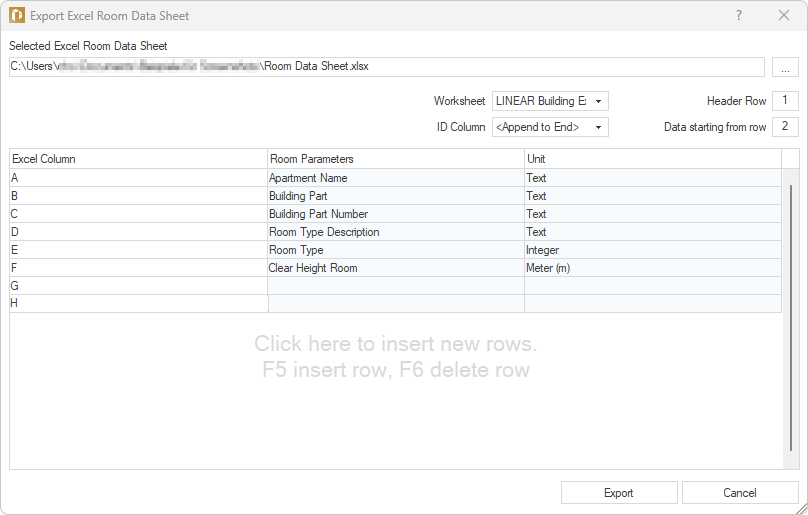
Selected Excel Room Data Sheet
Shows the path to the currently selected Excel file to which the building data will be exported. Clicking on  opens the file explorer and allows you to select another existing file. If you specify a new file name, a new file with that name will be created automatically.
Settings
Worksheet
Drop-down list for selecting the worksheet in the Excel file to which the building data will be exported.
ID Column
Dropdown list for selecting the column in which LINEAR Building IDs are written for unique identification of rooms. If the specified column already contains entries, clicking Export will bring up a dialog in which you can cancel the operation and select another column or overwrite existing values.
Header Row
Index of the row in which the headings, i.e., the names of the Excel columns for the Room Data Sheet, are written.
Data Starting from Row
Row from which the Room Data Sheet data should start in the Excel Room Data Sheet.
Table
In this table, you assign the room parameters for export to the Excel columns.
| Table Column | Description |
|---|---|
| Excel Column |
Displays the columns to which the selected parameters will be written. If a new Excel file is created for export, this column is still empty. You can enter custom labels in the cells of the column. |
| Room Parameters |
Clicking on a cell activates the button If necessary, you can create additional room parameters for assignment by selecting New Parameter in the context menu and then specifying the name and unit of the parameter. After exporting to an Excel file, new parameters are also available for import in the Room Data Sheet module. |
| Unit |
Shows the unit with which an assigned prameter is imported. The unit cannot be altered. |
 , which opens a context menu where room parameters can be assigned to the data for the Excel Room Data Sheet. The assignments are stored internally in the program. When exporting to an Excel Room Data Sheet in future, the program will automatically suggest a suitable assignment if it matches the Room Data Sheet columns of the last mapping used.
Export
Exports the data to an Excel Room Data Sheet according to the settings you have made.