You are here:
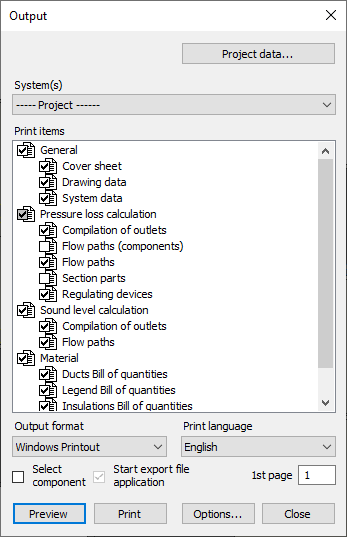
Project Data...
Opens the Project data dialog, in which you can enter project-relevant data for the printout.
System(s) and Print items
System(s)
Defines the systems whose calculations and material lists you want to print.
Sort Alphabetically
Enabled: The attachments in the drop-down list are sorted alphabetically.
Print Items
Specifies the information you want to output. Right-clicking a print items opens a context menu where you can open the underlying print layout for editing in the print layout editor.
Print options
|
Element |
Function |
|---|---|
|
Output Format |
For Windows-Printout selection, the Preview and Print buttons are activated. For all other formats the Export to one of the following formats is available:
|
|
Print Language |
If necessary, select the print language deviating from the user interface language. For selection, all licensed language packs are available. |
|
Select Components |
Enabled: Before printing, you can select the components to be printed in the parts list. Disabled: All components of the selected system are included in the printout. |
|
Start Export File Application |
Enabled: After export, depending on the selection in the Output Format field, opens the application set up under Windows for editing the output file (e.g. Microsoft Excel for files with the extension *.xslx). |
|
1. Page |
Specifies the number of the first page of the output. |
|
Preview |
Opens a preview of the printout. |
|
Print/Export |
Prints or exports the selected print items with the settings made. |
|
Options |
Opens the Print options dialog in which you can specify the editor for ACSII output. The Windows Editor is used by default. |