-
In the scheme, click on the pipe section you would like to edit.
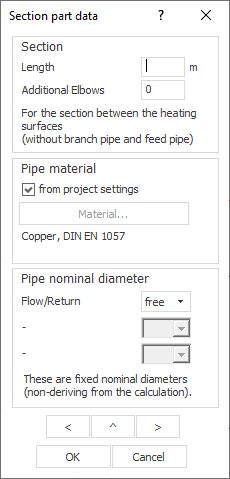
The Pipe run data dialog opens.
-
In the Section area, specify the Length of the pipe section and the number of Additional bends.
-
In the Pipe material section, assign a pipe material to the section that differs from the project setting by deactivating the checkbox from Project setting, clicking the now activated Material... button and selecting the desired material in the Pipe tables dialog.
-
In the Nominal pipe diameter section, set the nominal diameters for the pipes in the pipe section.
-
Use the
 and
and  buttons to switch to the adjacent pipe sections and set their data.
The currently selected pipe section is shown dashed in the scheme.
-
Use the button
 to switch to vertical tether feed pipes and set their data.
 -
Close the dialog with OK when you have set the data of all pipe sections of your scheme.
The pipe section data of the scheme are set.