Details on Settings - Calculation Parameters
Information about the Calculation Parameters tab in the Settings dialog of the Potable Water Scheme module.
On this tab, you make global settings for the calculation and define the calculation method and limit values. The settings are saved with the project. Exceptions are noted accordingly.
You are here:
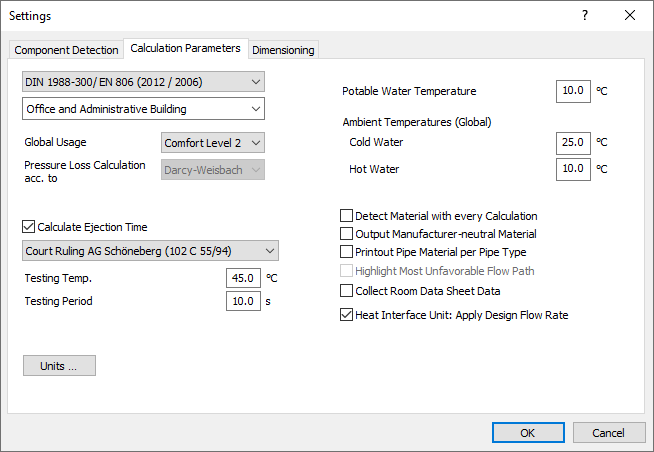
Calculation Method
Select the calculation method to be used for calculation. Depending on the calculation method, some parameters and settings may change or may not be available. The following calculation methods are available:
-
DIN 1988-3
-
DIN 1988-300/EN806
-
Vewin Werkbladen 2.1
-
SVGW W3
-
SP 30.13330. 2016 and SP 30.13330. 2020
-
ÖNORM B 2531 2531
-
PN 92 / B-1706
Type of Building
Available building types depend on the selected calculation basis. Select the building type to be used when determining peak flow rates within the network.
For SP 30.13330.2016 and SP 30.13330.2020:
Some building types do not consider hot water pipes. If hot water pipes are nevertheless included in the scheme, a message is issued in the Log.
Calculation flow rates for each building type are stored and can be displayed as information via the  button. If you select Special Building (User Values) as the building type, you can use the upper button to create the corresponding consumption values for this building by yourself. The lower
  button opens the Manage User-Defined Building Types dialog, where you can create and manage any number of user-defined building types. These data are saved in a separate file and are available to you in all other projects.
For PN 92 / B-1706:
Peak flow rates are stored for the predefined building types that you can select from the drop-down list. The button allows you to create and manage any number of user-defined building types specifying the coefficients for calculating the peak flow rate according to the specified standard. The building types created are saved in the project and are then available for selection in the drop-down list for selecting the building type.
Global Usage
Only available for the calculation methods DIN 1988-300/EN 806 and ÖNorm B 2531 and defines the comfort level applied for the entire project. The selection of the comfort level is required for the determination of the ejection times according to VDI 6003.
Pressure Loss Calculation acc. to
Displays the calculation basis for pressure loss calculation.
Calculate Ejection Time
Test Temperature/Test Time
Enabled: The calculation determines the discharge times for hot water consumers and compares them with the corresponding specifications. If there is non-compliance, a message is issued in the log. Select User-Defined from the drop-down list to specify your own values for the test temperature and test time. When calculating the ejection time according to VDI 6003, you have to select a comfort level in the calculation parameters. For component types not covered by VDI 6003, you can specify the desired Test Temperature and Test Time manually.
For the SP 30.13330.2016 and SP 30.13330.2020 calculation methods, no calculation of the ejection time is performed and the range is not displayed.
Potable Water Temperature (PWC)
Most calculation methods specify a reference temperature of 10 °C for calculating the fluid properties for potable water (cold). Enter a different number if a deviating temperature is to be used for calculation.
Ambient Temperature (Global)
If necessary, adjust the values for the global ambient temperatures to be assigned to the sections.
Cold Water: Sets the ambient temperature for all cold water sections. The default value according to the standard is 25 °C.
Hot Water: Sets the ambient temperature for all hot water and circulation sections. The default value according to the standard is 10 °C.
Calculation Presettings
| Check box | Description |
|---|---|
| Detect Material with Every Calculation | Enabled: The material for the material compilation is determined with each calculation. Disabled: The calculation does not detect the material for the material compilation. For large project where changes in material are not to be expected, this can shorten calculation time. These settings are not saved in your project but in an external configuration file and will be applicable to all potable water projects. |
| Output Material as Manufacturer-Neutral | Enabled: When issuing parts lists, manufacturer components are listed without the manufacturer name and without the item number in the neutral components section. If you change this option, you must recalculate the network before reissuing it. |
| Printout Pipe Material per Pipe Type | This option is not available in LINEAR Building. |
| Highlight Most Unfavorable Flow Path | This option is not available in LINEAR Building. |
| Collect Room Data Sheet Data | This option is not available schemes in LINEAR Building. |
| Flat Station: Apply Design Flow Rate | Enabled: To calculate pressure loss for manufacturer specific heat interface units, the flow rate from the dimensioning of the heat exchanger is used. Flow rate for this heat interface unit is still method-specific. Disabled: To calculate pressure loss for manufacturer specific heat interface units, the flow rate based on the method for pressure loss calculation will be used. |