Selecting Manufacturer for Pipe Material
Shows step by step how to select a manufacturer for the pipe material of your scheme. You can then choose from the different pipe materials offered by the selected manufacturer.
Before you begin
You would like to select a manufacturer to then select a specific pipe material from this manufacturer in the Pipe tables dialog.
Requirement:
The product data sets of the desired manufacturer are installed and licensed, if applicable.
Navigate to
Applies to Heating, Potable water, Waste water and Gas.
Procedure
- In the Material section click the button Manufacturer selection....
The Manufacturer selection dialog opens.
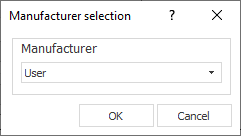
- Select the desired manufacturer from the drop-down list and click OK.
Results
You have selected the desired manufacturer and its pipe materials are now available in the Pipe tables dialog.