Details on Settings – Dimensioning
Information on the Dimensioning tab in the Settings dialog for the Scheme Potable Water module.
In this tab, you define maximum velocities as limit values for dimensioning. The settings are saved with the project. Exceptions are noted accordingly.
You are here
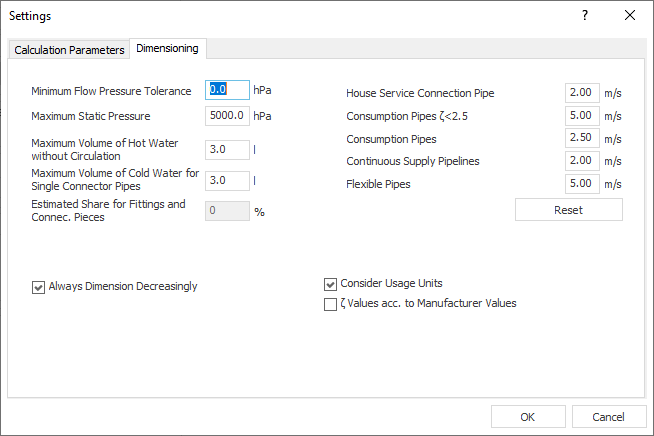
Minimum Flow Pressure Tolerance
Due to dimensioning during calculation, the network is throttled in such a way that minimum flow pressure is just about reached for all faucets. If you want to permit narrow undershoot of minimum flow pressure for selected faucets, enter a maximum value for the undershoot here.
Maximum Static Pressure
The value is preset to 5000 hPa and can be adjusted if necessary.
If the maximum resting pressure is exceeded, a message is displayed on the Log tab for noise protection reasons.
Maximum Volume of Hot Water without Circulation
Enter a limit value for the maximum volume of hot water pipes outside the circulation circuit. If a larger volume is calculated, a message is displayed on the Log tab.
Maximum Volume of Col Water for Single Connector Pipes
Enter a limit value for the maximum volume for cold water single connector pipes that connect consumer to the pipe network. If a larger volume is calculated, a message is displayed on the Log tab.
Estimated Portion for Fittings and Connection Pieces
Enter a percentage for the portion of fittings and joining pieces you want to be considered during calculation.
Maximum Velocities
The values for maximum speeds depend on the set calculation method. Maximum velocities are intended for the flow rates for the different sections of the potable water network. You can edit the values for your project.
House Service Connection Pipe
Pipes from the tapping clamp to the main shut-off device (MSV).
Consumption Pipes (Zeta < 2.5)
All pipes in which a Zeta value is less than 2.5. Fittings will not be considered.
All other pipes where the Zeta value is less than 2.5.
Consumption Pipes
All pipes in which a Zeta value is greater than or equal to 2.5. Fittings will not be considered.
All remaining pipes where the Zeta value is greater than or equal to 2.5.
Continuous Supply Pipelines
All pipes that serve a continuous consumer.
Flexible Pipes
All pipes that have flexible pipe material assigned from the Pipe Tables.
Reset: Resets all velocities to the DIN values originally proposed by the program.
Velocity Limits
When selecting the Russian potable water standard SP 30.13330.2020, you can additionally select the velocity limits based on sound levels according to the standard as a default for the pipe network calculation. Select the Velocity Limits option to do this. By clicking the button, you open the dialog Velocity Limits according to SP 30.13330.2020, where you will find an overview of the standard values.
Always dimension decreasingly
Enabled: A section part will always be either as large or smaller than the one preceding it (in direction of the tapping point).
Disabled: It may under certain circumstances happen, during throttling the network by dimensioning pipes, a section part further away from the network starting point is dimensioned larger than sections closer to the network start.
Consider Usage Units
If usage units have been defined, you can exclude them from the calculation. This allows you to compare both calculation results (with and without usage units).
Enabled: The dimensioning takes into account the usage units that you have assigned to the consumers.
Disabled: If you created usage units, you can exclude them from calculation without losing the assignment. You can compare calculation results with and without usage units. If you have assigned usage units but the checkbox Consider usage units is unchecked, a message will appear on the Log tab. If you carry out a calculation with assigned usage units and without activating Consider Usage Units option, the calculation is based only on the simultaneity curves for this building type.
As part of the calculation methods SP 30.13330.2016 and SP 30.13330.2020, it is necessary to define usage units in order to determine the number of users.
Zeta Values based on Manufacturer Values
Enabled: If you use manufacturer pipe systems containing real, measured zeta values provided by the manufacturer, they will be used for calculation. If manufacturer zeta values are not available, norm zeta values are used.
Disabled: Norm zeta values are used during calculation regardless of the selected pipe system.