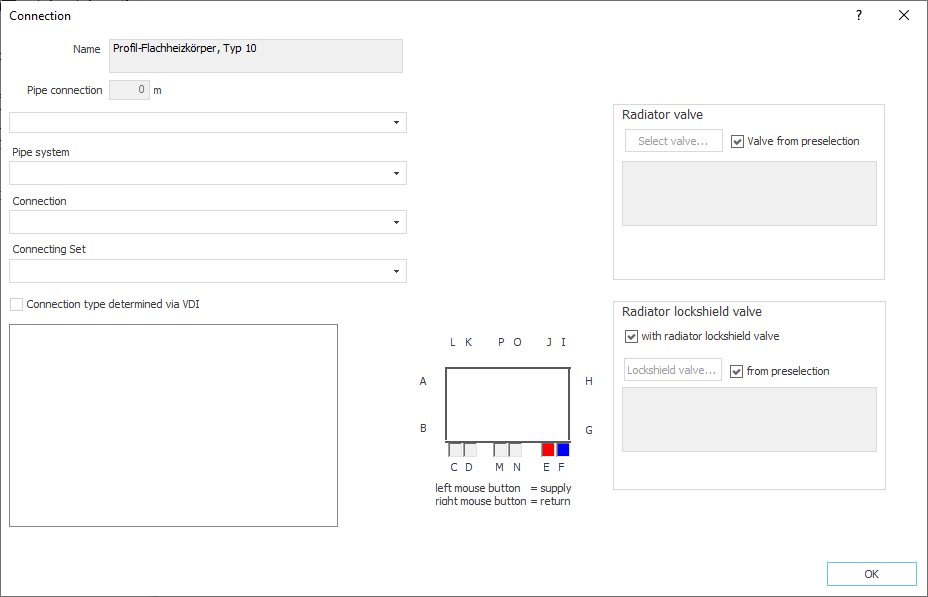
Here you can select pipe systems and connection sets from various manufacturers. The connection position of the radiator is displayed and can be changed. Moreover, you can choose whether to use the radiator valve and radiator lockshield valve from the valve preselection or you can select another valve or radiator lockshield valve for the radiator.
You are here:
Name
Displays the model name of the radiator. You cannot modify the name.
Feed pipe length
Specifies the length of the feed pipe added for the supply and return water. This length is multiplied by the number of radiators. If the individual radiators should not get the same connection lengths, enter the radiators individually in the room view.
Manufacturer
Defines the manufacturer. Manufacturers are only available if corresponding product data sets with suitable pipe systems have been installed and licensed.
Pipe system
Defines the pipe material.
Connecting Set
Defines the connecting set. Not all pipe systems include connecting sets.
Connection type determined via VDI
If you have used a VDI record for the radiator design, the selection of the connection position is restricted by the manufacturer and depends on the selected connection set. If you still want to change the connection position freely, deactivate Connection type determined via VDI and select the desired connection position via the graphical display of the connection position in the middle of the dialog.
Location of connection
Modifies the location of connection. Click with the left mouse button on a connection to determine the location of a connection. Click with the right mouse button on a connection to determine the location of a connection.
Radiator valve, Radiator lockshield valve
First, all radiators are assigned the radiator valve and the radiator lockshield valve that was selected in the valve preselection on the Valve preselections page (). For individual radiators, you can select a different valve if necessary or change or remove the radiator lockshield valve. If no valve has been selected in the global valve preselection, a neutral shut-off valve will automatically be used.
Radiator valve
Select valve: Opens the Select valve series dialog where you can assign a different valve to the radiator. The button is only activated if the checkbox Valve from preselection is deactivated.
Valve from preselection
Enabled: The valve from the valve preselection for the radiator is used.
Disabled: You can assign a different valve to the radiator. Click the button Select valve..., to set a different valve in the dialog Select valve series. The selected valve is then displayed in the Radiator valve section.
Radiator lockshield valve
With radiator lockshield valve
Enabled: The radiator has a radiator lockshield valve.
Disabled: The radiator has no radiator lockshield valve.
Valve...: Opens the Select valve series dialog where you can assign a different radiator lockshield valve to the radiator. The button is only enabled if the checkbox from preselection is disabled.
from preselection
Enabled: The valve from the lockshield preselection for the radiator is used.
Disabled: You can assign a different radiator lockshield valve to the radiator. Click the button Valve..., to set a different bolting the dialog Select valve series. The selected valve is then displayed in the section Radiator valve.