You are here:
or
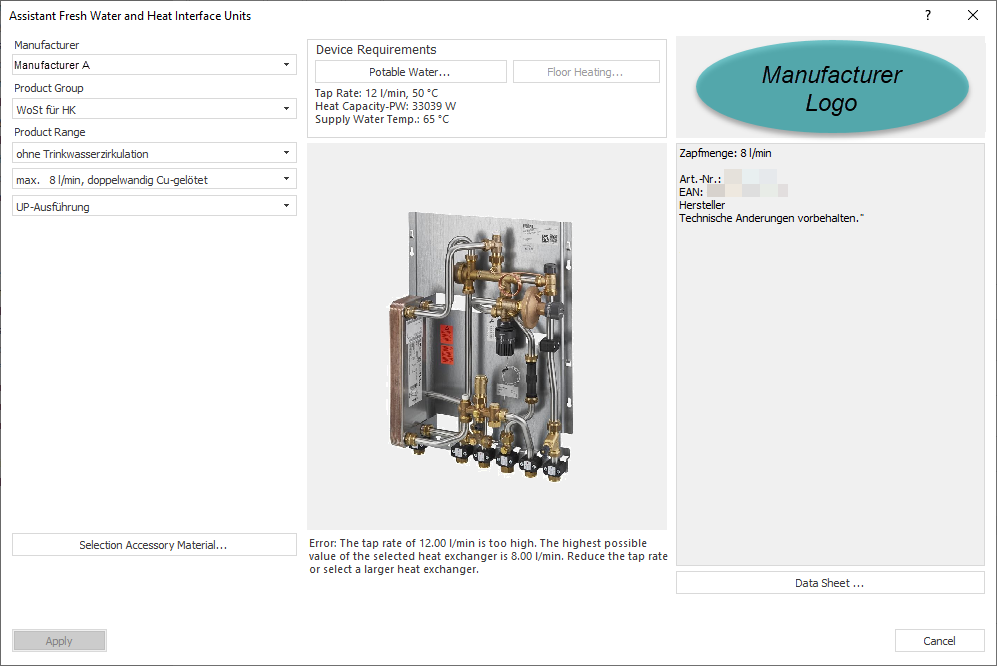
Manufacturer, Product group, Product range
Select manufacturer, product group and version of the product. If you select a model including water meter calorimeter, the Calorimeter and Water meter sections are displayed.
Calorimeter, Water meter
Enter Nominal volume flow rate and Pressure loss for each of the meters if the product contains a heat quantity and water meter.
Selection Accessory material ...
Opens a dialog in which you can select accessory material that the manufacturer provides for this product. The accessory material is listed in the material compilation.
Potable Water...
Opens the Requirement Potable Water dialog, in which you can enter the potable water heating requirements for the heat interface unit.
Floor heating...
Opens the Requirement Floor Heating dialog, in which you can enter the floor heating requirements for the heat interface unit.
Product illustration
Shows a preview of the selected product. Some manufacturers also offer a link via the product image to their homepage, where you can find more information about the products.
Design capacity, Error messages, Notes
The design data is displayed below the product image. If the selected product does not match the entered requirement for potable water and heating, an error message is displayed below the product illustration and the heat interface unit cannot be transferred into the scheme. If the errors are corrected, the design data is displayed instead of the error message and the button Apply is activated. Depending on the product, additional information texts are displayed below the design data or error message.
Technical data and Data sheet ...
If the manufacturer provides technical data and a data sheet in the data set, you can view these here.
Apply
After clicking Apply, the heat interface unit with the specified default settings is placed at the previously selected position in the scheme.