If you want to lay out the ventilation components of your project after selecting the manufacturer and the preset, this dialog opens. If you have opened the dialog from project level and if you are performing the layout per ventilation zone, this dialog opens for each ventilation zone in the project.
You are here:
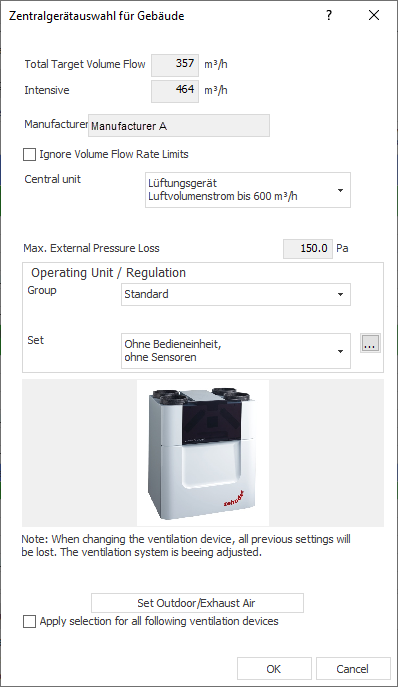
Total Target Volume Flow Rate
Displays the total target volume flow determined in the ventilation concept for the ventilation zone or for the project.
Intensive Ventilation
Indicates 130 % of the total target volume flow rate. Intensive ventilation is used to reduce peak loads caused by cooking and washing, for example. The user can also be partially involved here with active window ventilation.
Manufacturer
Displays the manufacturer of the selected central unit.
Ignore Volume Flow Limits
Enabled: Also shows ventilation units whose volume flow rate limits are below the determined volume flow.
Disabled: Ventilation units that cannot provide the determined volume flows are not displayed in the list.
Central Unit
Drop-down list for selecting a central device. The list contains manufacturer devices that are compatible with the selected preset.
Recommended Maximum External Pressure Loss
Displays the maximum external pressure loss recommended for the selected device.
Group
Drop-down list for selecting the operating group for the central device. One group contains specific sets that can be selected in the next drop-down list.
Set
Drop-down list for selecting the desired set for operating the central device.
 : Opens the Item Set for [...] dialog, in which you can view and edit the item set of the selected set.
Set Outdoor Air/Exhaust Air
Opens the dialog where you can make settings for the outdoor air exhaust air.
Apply Selection for All Following Ventilation Devices
Applies the settings made in this dialog to the ventilation units of all other ventilation zones.