In this dialog, you can define calculation formulas for parameter values that contain parameter and/or variable references.
You are here
or
Module Overview ➤ Room Data Sheet ➤  Property Sets (Toolbar) ➤
  Calculation Column (Selected Parameters)
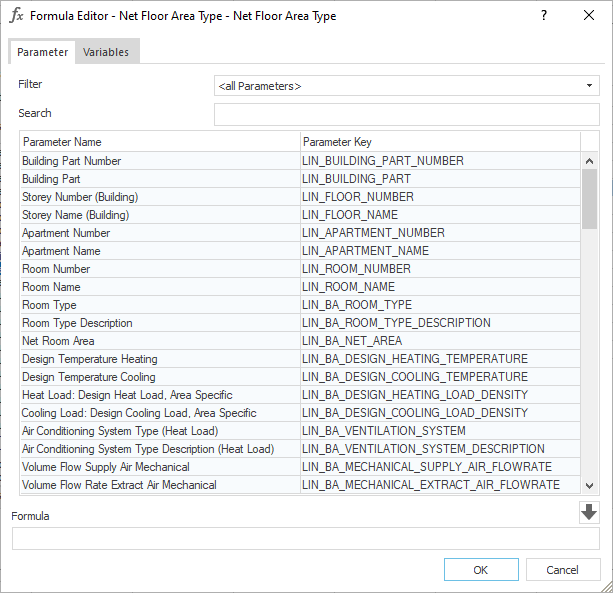
Parameter
You can transfer parameters to the Formula field by double-clicking or using the  button. If the cursor is in the input field, the parameter key is inserted at the cursor position.
Filter
Dropdown list for selecting a filter for the list of parameters. After selecting a parameter category, the list is reduced to the Room Parameters of that category.
Search
Field for entering a search term. You can search the list of parameters by parameter name and their keys or by components of parameter names or keys. The search automatically adjusts as you type. Upper and lower case is not considered.
Parameter Name
Displays the names of the parameters.
Parameter Keys
Displays the parameter keys of the parameters.
Add Parameters to Formula
Transfers the parameter key of the selected parameter to the Formula field. Alternatively, you can double-click on the parameter. If the cursor is in the input field, the parameter key is inserted at the cursor position.
Variables
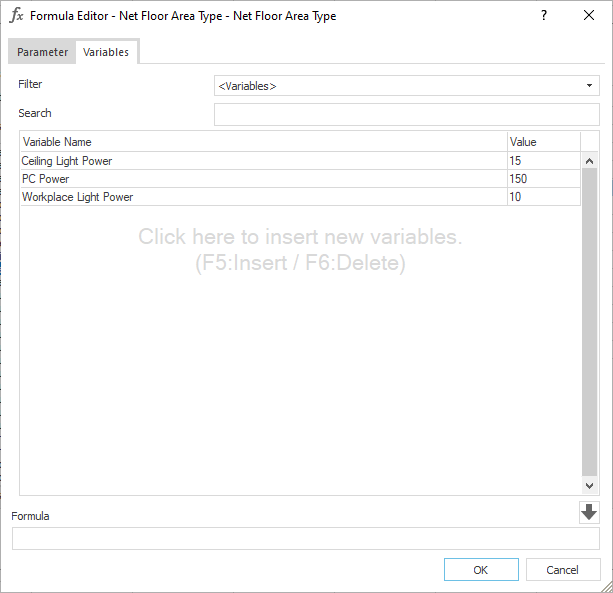
On this tab, you can create and edit user-defined variables for calculation formulas and add them to the Formula field. You can transfer parameters to the input field by double-clicking or using the button. If the cursor is in the input field, the variable is inserted at the cursor position.
Search
Field for entering a search term. You can search the list of variables by variable name or by parts of names. The search starts automatically after you enter the first character and is updated after you enter further characters. Upper and lower case is not considered.
Variable Name
Defines the name of the variable.
Value
Defines the the value of the variable.
Add Parameters to Formula
Transfers the parameter key of the selected parameter to the Formula field. Alternatively, you can double-click on the parameter. If the cursor is in the field, the parameter key is inserted at the cursor position.
Formula
Field for defining the calculation formula for the parameter values. When defining the calculation formula, you can use the formula syntax based on Microsoft Excel, including the operating functions. You can use either German expressions (WENN, SUMME, …) or English expressions (IF, SUM, …) The results of the calculation formulas can be text, Boolean values, or numbers.
The following table lists the available Excel-like formula syntax that can be used in the Formula field. Prefacing functions with "=" is optional. The values passed to these functions can come from parameters or variables.
| Operator or Function | Meaning | Example |
|---|---|---|
| + | Addition | 3+4 returns 7 |
| - | Subtraction | 10-3 returns 7 |
| * | Multiplication | 5*6 returns 30 |
| / | Division | 10/2 returns 5 |
| ^ | Exponentiation | 2^3 returns 8 |
| = | Equal to | 5=5 returns 1 (True) |
| <> | Not equal to | 5<>3 returns 1 (True) |
| < | Less than | 5<5 returns 1 (True) |
| <= | Less than or equal to | 3<=5 returns 1 (True) |
| > | Greater than | 7>5 returns 1 (True) |
| >= | Greater than or equal to | 7>=5 returns 1 (True) |
| % | Postfix percentage (converts a number to a percentage) | 50% returns in 0.5 |
| & | Connection (linking of texts) | "Hello"&"World" returns "HelloWorld" |
| SUM | Calculates the sum of numbers | SUM(10, 20, 30 ) returns 60 |
| AVERAGE | Calculates the average of numbers | AVERAGE(10, 20, 30 ) returns 20 |
| MIN | Returns the smallest value from a list of numbers | MIN(10, 20, 30 ) equals 10 |
| MAX | Returns the largest value from a list of numbers | MAX(10, 20, 30 ) returns 30 |
| IF | Performs a logical check and returns one of two values | IF(10 >5, "Yes", "No") returns "Yes" |
| IFERROR | Returns the first value if no error occurs; otherwise, returns the second value | IFERROR(10/0, "Error") returns "Error" |
| ROUND | Rounds a number to a specified number of decimal places | ROUND(12.345, 2 ) returns 12.35 |
| ABS | Returns the absolute value of a number | ABS(-30) returns 10 |
| LEN | Returns the length of a text | LEN("Hello”) returns 5 |
| TRIM | Removes leading and trailing spaces from a text | TRIM("Hello World ") returns "Hello World" |
| VALUE | Converts text into a number | VALUE("123,45") returns 123.45 |
| TEXT | Converts a number to a text using a specific format | TEXT(1234.56, "0,00") ) returns "1234.56" |
| LOWER | Converts text to lowercase | LOWER("HELLO”) returns "hello" |
| UPPER | Converts text to uppercase | UPPER("hello”) returns "HELLO" |
| LEFT | Returns a specified number of characters from the beginning of a text | LEFT("Hello World", 5) returns "Hello" |
| RIGHT | Returns a specified number of characters from the end of a text | RIGHT("Hello World", 5) returns “World" |
| MID | Returns a specified number of characters from a text starting at a specified position | MID("Hello World", 7, 5) returns “World" |
| CONCAT | Combines multiple texts into a single text | CONCAT("Hello”, “ “, "World") returns "Hello World" |
| FIND | Search for text within another text (case-sensitive) | FIND(“World”, "Hello World”) returns 6 |
| SEARCH | Search for text within another text (not case-sensitive) | SEARCH(“world”, "Hello World”) returns 6 |
| SUBSTITUTE | Replaces one text with another | SUBSTITUTE("Hello World", "World", "Earth") returns "Hello Earth" |
| REPLACE | Replaces a specified number of characters in a text with another text | REPLACE("Hello World", 7, 4, "Earth") returns "Hello Earth" |
| DATE | Creates a date from the year, month, and day | DATE(2025, 9, 22 ) returns "9/22/2025" |
| TODAY | Returns the current date | TODAY() returns the current date in the format "MM/DD/YYYY" |
| COUNTIF | Counts the number of cells that meet a criterion | COUNTIF(10, 20, 30, ">15") returns 2 |