In this dialog, you can enter an AI prompt to filter the room data sheet entries and apply the filter.
You are here
Module Overview ➤ Room Data Sheet ➤  AI Room Filter (Toolbar)
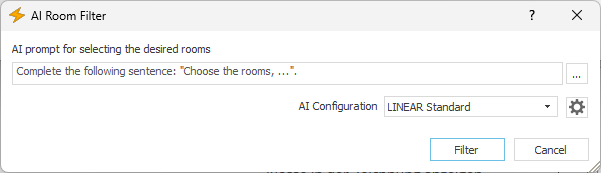
AI prompt for selecting the rooms you're looking for
Input Fields:
Enter an addition to the displayed beginning of the sentence in this field. This will supplement the predefined AI prompt, which you can then submit by clicking Filter.
 Examples and recently used prompts
Opens a context menu for selecting predefined and previously used AI prompts.
AI Configuration
Use this drop-down list to select a configuration for the AI request. By default, the LINEAR Standard configuration is available, which currently uses the gpt-4.1-mini model from OpenAI. Selecting + Create New Configuration opens the AI Model Settings dialog, where you can select an AI provider and connect to your account via the API. Once you have created this configuration, you can select it from the drop-down list.
 Settings for the AI Model
Opens the Settings for the AI Model dialog, where you can edit the currently selected configuration.
Filter
Closes the dialog box and filters the room data sheet view according to the AI prompt.