The individual tabs of the LINEAR control board are organized to
represent a workflow from left to right: You start on the Project
Tab with the basic project settings and the creation of the required
views. Selecting a discipline provides tools in the other tabs that relate to the
discipline. In the second step you switch to the Construction Tab
to construct pipe or duct networks. In the third step, you add components such as air
diffusers, radiators or pumps to the pipe or duct network. You can do this in the
Library Tab. In the fourth step, the finished MEP model can be
calculated and completed to the desired level of detail. To do this, switch to the
Analyse Tab. The Issues and Tasks tab
allows you to exchange information at specific times with project participants using a
BCF file.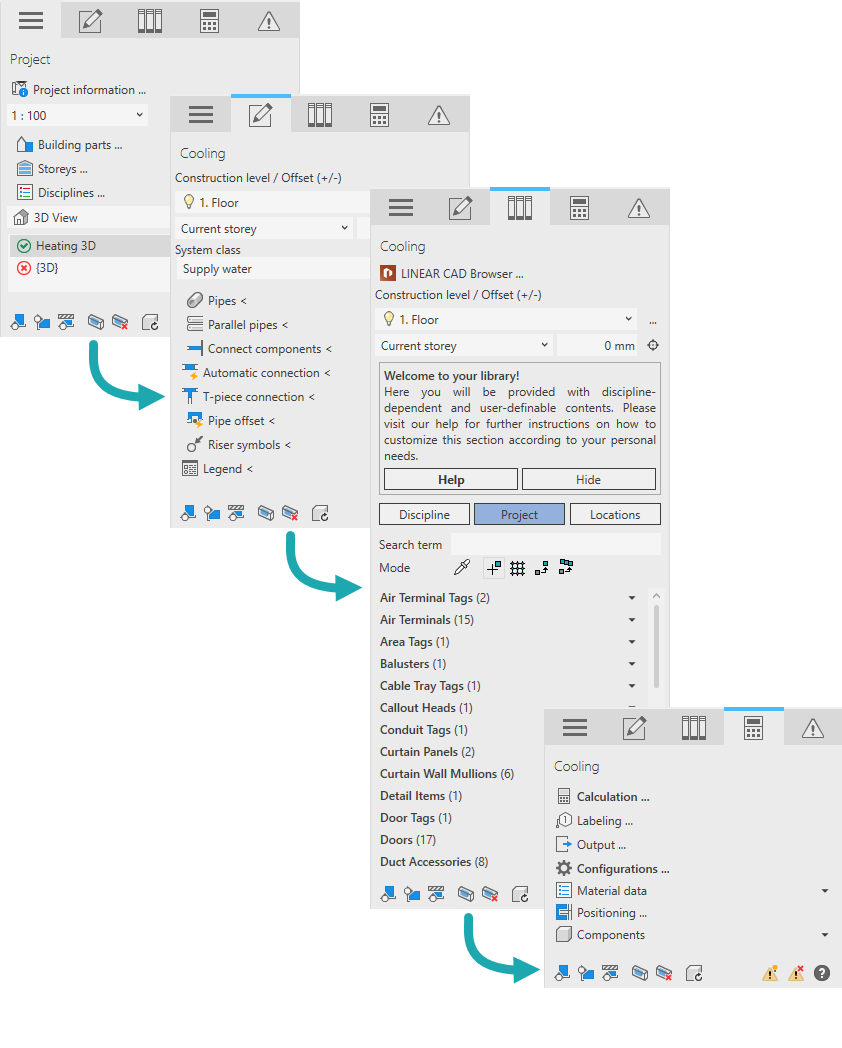
About the Control Board Workflow
Explains the concept of the workflow in the LINEAR Control Board.