-
Click on the pipe run button
 of a storey.
The following context menu opens.
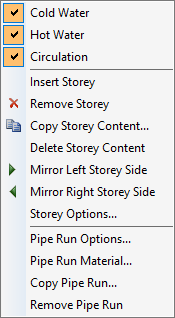
The media Cold water, Hot water and Circulation are preset in new projects and marked with a check mark
 .
. -
If necessary, deselect the media that you do not need in this pipe run.
You have set the pipes of the pipe run and the media are shown on the pipe run button  .
.