-
In the scheme view, click in an area outside of symbol fields while holding down the left mouse button and dragging a selection frame around the symbols you want to select.
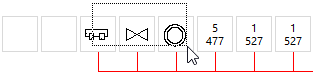
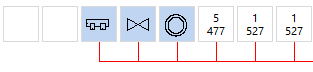
The corresponding symbols have been selected.
LINEAR Revit V26
Shows how to make a multiple selection in the pipe run scheme.
In the scheme view, click in an area outside of symbol fields while holding down the left mouse button and dragging a selection frame around the symbols you want to select.
The corresponding symbols have been selected.