In this area, you define the room-specific settings for the approximate determination of the required air volumes for rooms in non-residential buildings.
You are here
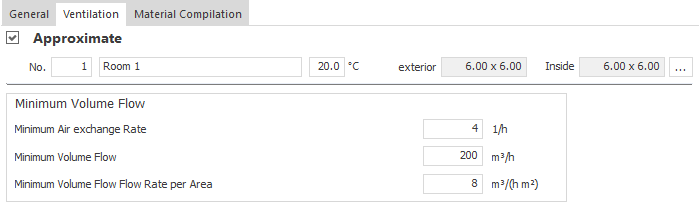
General Room Data
The room number, the room name and the room temperature for the heating or cooling mode are displayed on the left-hand side, which you can adjust as required. Depending on the module, you can use the button  to the right of the room temperature to open the Temperatures dialog, in which you can select the temperature variables stored in the master tables and create new temperature variables.
The area resulting from the clear internal dimensions and the clear internal dimensions of the room are displayed in brackets in the right-hand area.
 : Opens the Room Data dialog in which you can adjust the parameters of the room.
Minimum Volume Flow Rate
In this area, you enter the values for the methods for determining the required air volumes. You can determine the required air volumes on the basis of a minimum air exchange rate and/or an area-related minimum volume flow rate. You can also specify a fixed minimum volume flow rate.The air volume flow rate with the highest value is used as the required air volume. The individual resulting volume flow rates are displayed on the Results tab.
Minimum Air Exchange Rate
Defines the value for determining the required air volumes based on the Minimum Air Exchange Rate.
Minimum Volume Flow Rate
Defines a fixed minimum volume flow rate for the room.
Minimum Volume Flow Flow Rate per Area
Defines the value for determining the required air volumes based on the area-related minimum volume flow rate.