Problem
During building detection, components that are not adjacent to the ground in the model are registered as adjacent to the ground.
Possible cause: Reference level of building detection
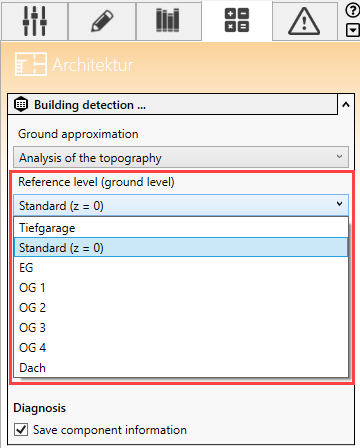
If you have selected the Constant ground level option on the Analysis tab for the Ground approximation prior to the building detection in the Architecture discipline, the Reference level (ground level) is used to determine at which level the intersection with the ground is located. In this case, if you have selected Level 3, for example, the exterior walls and windows of the floors below will all be detected as being adjacent to the ground.
Solution
- Check that the correct reference
level is set in the building detection settings. The standard setting is
Standard (z = 0).
Possible cause: Position of topographic maps
When using topographic maps, incorrect positioning of maps can result in components being incorrectly detected as being adjacent to the ground.
Solution
- Check the position of the topographic map and make sure that there are no other topographic maps (even hidden ones) with possibly wrong position in the model.