-
In the symbol bar, click
 to establish up the connection to your CAD program.
 -
In the table of radiators or cooling convectors, click in the row of the radiator or cooling convector that you want to label.
-
Click on the button
 in the symbol bar.
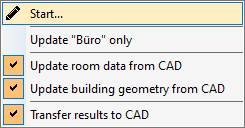
LINEAR Building The following menu opens:
-
Select the desired option to update the radiators or cooling convector in the CAD program and click on Start ....
Updating Drawn Radiators or Cooling Convectors
Shows step-by-step how to update radiators or cooling convectors that have already been placed and labeled in the CAD program, if data has been subsequently changed in LINEAR Building.