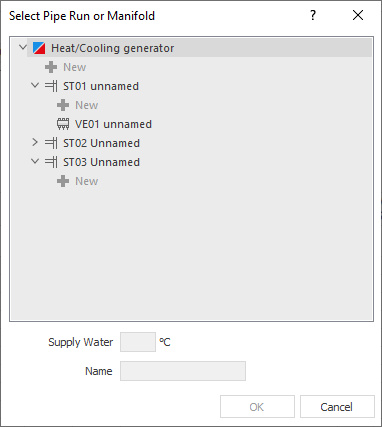
Enables assignment to pipe runs, manifolds and manifold connections. You can also create new pipe runs, manifolds or closed-loop controls for a heat/cooling generator and edit the structure. The components and component groups that you can add depend on the level of the  button.
You are here:
|
Element |
Description |
|---|---|
|
|
Contains for example boilers or cooling generators for radiant cooling. The pipe runs and regulations are subordinate to heating/cooling generators. Click |
|
|
Contains radiant heating manifolds and radiators. Click |
|
|
Contains manifold connections for heating circuits and feed pipes. You can assign radiators to a radiant heating manifold, for example if only radiant heating is installed in the entire house and a single radiator should be installed in the bathroom. Pay attention to the lower pipe run temperatures. |
|
|
Contains the floor and room number, model and type name, and radiator dimensions. You can drag and drop radiators to another pipe run. Depending on the selected storey ( pipe run, manifold or radiator ) at the right side you see the corresponding input area. |
|
|
Contains the radiators available in the one-pipe run. |
 Heat-/Cooling generator
 Pipe Runs
 Manifold for radiant heating and cooling
 Radiators
 One-pipe run
Supply Water Temperature
Shows the supply water temperature of the selected component.
Name
Allows you to rename components or to name newly added components.