-
If the architecture or MEP components are located in a linked file, select Architecture in Link or MEP Components in Link.
-
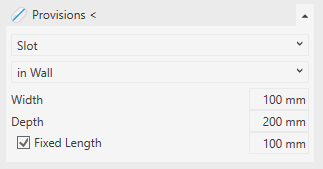
Open the Provisions < section.
-
Select Slot as the type of void and specify the placement of the slot.
-
Enter the dimensions of the slot.
If you would like to place the slot by selecting the start and end points in the model, deactivate Fixed Length.
-
Click Provisions < and follow the displayed instructions.
The slot is placed in the model and is represented by a provision.