You are here:
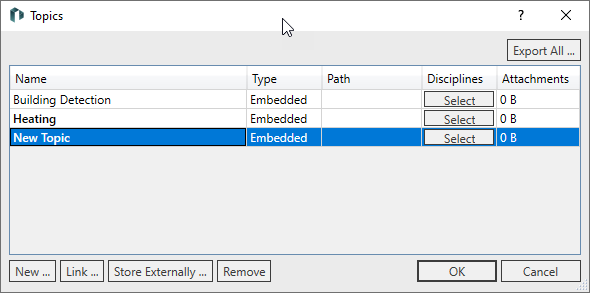
Table
Each row represents a topic.
|
Column |
Content |
|---|---|
|
Name |
The name of the topic. |
|
Type |
Can be either embedded or external. Embedded topics are saved directly to the project. External topics are stored in a separate BCF file. |
|
Path |
The location of linked BCF files. |
|
Disciplines |
The disciplines in which the topic is displayed. Click select to open a corresponding list. |
|
Attachments |
File size of the files contained in the topic. |
|
Visible |
Opens the Visibility dialog in which you can make a topic visible either to all or only to assigned users. In this dialog you can also assign users. This button only appears when using the Revit function Collaborate. |
Buttons
|
Button |
Function |
|---|---|
|
Export all ... |
Exports all topics bundled as BCF or XLSX file. |
|
New... |
Creates a new topic. |
|
Link... |
Opens the File Explorer to link an external BCF file. |
|
Store externally... |
Exports and saves the selected embedded topic as a separate BCF file and changes the type in External (BCF). |
|
Remove |
Removes both embedded and linked topics from the project. |