
Image: © Nitcharee – stock.adobe.com
What exactly is AI, and what is it not?
Yes, this is a topic that’s been discussed ad nauseam and is almost boring, but since it’s not always easy to spot, we wanted to take a closer look at it here in the context of our specific application in MEP design.
Generally speaking, AI (Artificial Intelligence) refers to systems capable of performing tasks that previously required human intelligence, often with little to no apparent effort. One particularly successful approach in this area involves neural networks, which attempt to mimic the functioning of the human brain: with neurons, the connections between them (which vary in strength), receptors as the interface for perceiving the outside world, and the signals that are “fired” between receptors and neurons, as well as among the neurons themselves. What is referred to as "training" for such networks corresponds to the learning process in humans: Depending on the method used, the connections between the neurons are selectively strengthened or weakened until the network produces sufficiently good results for a given task.
In contrast, classical algorithms and mathematical functions follow predefined rules. These are by no means the older, weaker tools. An algorithm provides a description of a clearly defined method for solving a problem: A specific input always produces the same, unique output. This is referred to as a deterministic method. This applies not only to simple calculation formulas - such as those for pressure loss in a pipe - but also to more elaborate or even highly complex methods: resolution of collisions between pipes in three-dimensional space or calculation of entire hydraulic networks with thousands of nodes and consumers. All of this can be described in terms of clearly formulated rules and logic and is therefore solved deterministically. Such methods are quick, resource-efficient, and fully traceable. The key requirement is always the same: The problem must be fully describable by a set of rules. That is exactly where the application boundaries are drawn, and that is exactly where AI's practical applications begin.
AI as a shortcut and who needs to read the map
In theory, selecting the right tool would be straightforward, and in an engineering context, the decision would often favor the classical algorithm. In practice, things are different. Software developers and users alike are increasingly turning to language models, even in cases where the problem could actually be described precisely enough to be solved deterministically. The reason is the understandable: Developing a robust, tested, and maintainable algorithm costs time and expertise - a language model, on the other hand, delivers a solution in minutes that is often “good enough.” And if the result meets the requirements, it is not a difficult decision. This trade-off is generally legitimate - it is, after all, an economic decision, just like any other in the project business. But it carries a risk that is particularly serious in the engineering field: “Good enough” is not an objective statement, but a judgment, and that judgment requires professional expertise. If you don't know the application boundaries of an AI solution, you can't judge whether the result is actually acceptable.
A more subtle danger lurks in the background: The more often the shortcut is used, the less often the actual thought process is practiced. Professional expertise is not gained by simply consuming results, but by working through problems - through mistakes, corrections, and the gradual development of judgment. Anyone who permanently delegates calculations, dimensioning, or planning decisions to a language model, risks losing precisely the expertise needed to critically evaluate the AI’s results. This is not a hypothetical scenario: Let’s remember the effect that GPS navigation has had on our sense of direction - imperceptible, gradual, and only noticeable when the system fails. Avoiding AI cannot be the alternative, but rather to use it consciously: Understanding AI results rather than simply accepting them at face value; regularly training your own judgment; and actively cultivating your professional expertise - especially as the tools become increasingly powerful. Shortcuts must not replace human skills.
What is Autodesk doing with AI?
With Revit 2027, Autodesk introduced the Autodesk Assistant - along with some additional AI functionality - as a “Tech Preview.” What exactly this means, what the Assistant actually does today, how the technology behind it works, what is currently still missing, and what we can expect in the future will be explained below.
Important additional information: After this article was published, Autodesk Assistant has moved past the tech preview phase!
What Autodesk Assistant is (Today)
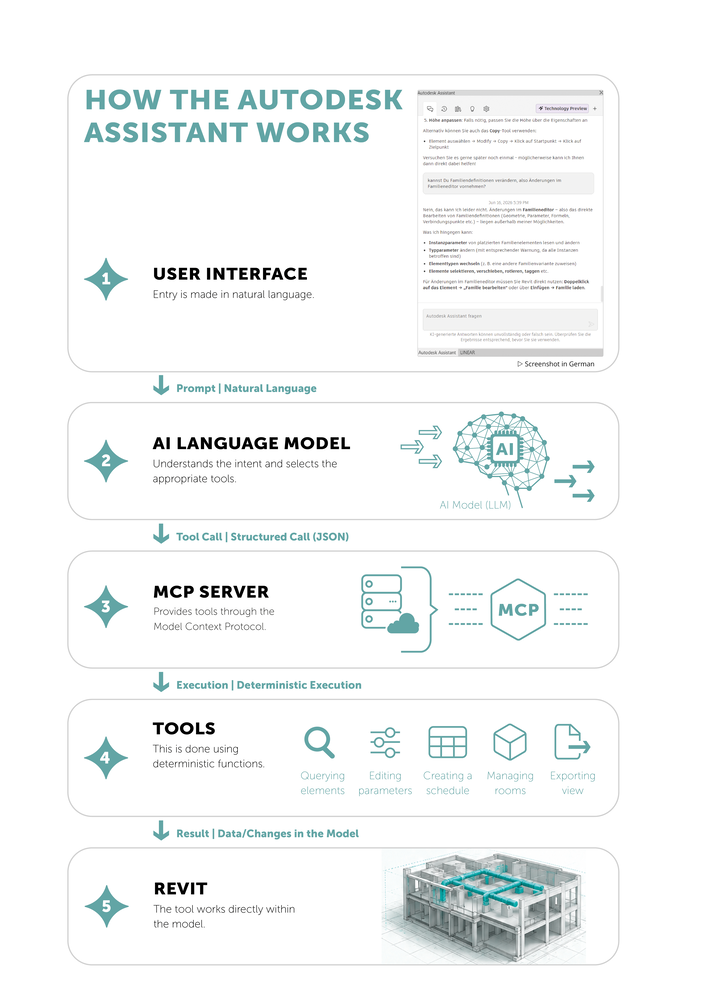
Autodesk Assistant is an AI assistant integrated directly into Revit that no longer just explains how to use a function but can also perform tasks within the model on its own.
In Revit, the Assistant's interface looks like a classic chatbot with a text box that prompts you to ask a question or describe a task. The Assistant works in the background using Autodesk's own AI Model.
To process the request, this AI model analyzes the entered prompt, compares it with the available tools, determines which tools need to be called and in what order, then calls them, and analyzes the (interim) results. These are then used as input parameters for the next call, ultimately leading to the desired result. If tasks are described in the prompt for which there are no suitable tools, the Assistant will notify the user and explain how the task could be solved manually.
The tools themselves are generally based on classic, deterministic program logic. They receive defined entries (parameters), operate on the model using the Revit API, and produce a predictable result. Same entry → same result. The AI model “only” accesses them, but it isn’t actually part of the functions. Nevertheless, the AI model plays a crucial role in orchestrating the tools - one that should not be underestimated. That is why it is also very important to use a “strong/intelligent” model at this stage. Whether the model currently used by Autodesk is already “good enough” for this task remains to be seen.
The tools that are available are determined by the loaded “MCP servers” (see the “Model Context Protocol (MCP)” section below). An MCP server provides a list of tools in a specified format. Each tool is described in detail: What does it do, what information does it need to work well, and whether and in what form a result is returned.
Currently, however, the Autodesk Assistant works exclusively with a single MCP server operated by Autodesk itself, with a fixed set of features. Specifically, this means: This feature is currently limited!
The functionality that Autodesk currently provides in its MCP Server is officially divided into six areas:
1. Model Queries
Querying and analyzing
elements and parameters
2. Sheet Management
Creating and organizing
drawing sheets
3. Room Management
Querying and administration
of room data
4. Schedules
Creating and organizing
schedules
5. Export
Outputting
model data
6. Element Operations
Editing elements
As clear as this structure may seem: Autodesk has so far only published a limited documentation of what each of these areas entails in detail - which is not unusual for a tech preview. What we can definitely say is that it is possible to retrieve model data and modify parameters on existing elements—the latter even in large quantities, involving hundreds of elements in a single operation. However, more in-depth model edits, such as creating new elements or editing family definitions, are not currently possible.
The following specific examples show how Autodesk Assistant can already be used today. They were carried out as part of our sample project “Office-Example-MEP” and therefore easy to try out.
The last two examples in particular illustrate the true strength of this approach: Performing such a consistency check in the traditional way would require a considerable amount of manual effort, for example, using schedules and closely examining the data. In theory, the Assistant can complete this task in a single workflow formulated in natural language. As is typical of AI, the results of these queries are not deterministic. Whether a room called “meeting point” should actually be called “meeting area” or not is certainly open to interpretation. The fact that this doesn't always work perfectly yet may be due to its preview status or to the AI model used by Autodesk Assistant.
Select and Filter
| Select all radiant ceiling panels in the project | Selects all families whose family name contains the word "Radiant Ceiling Panel" | YES |
| How many radiant ceiling panels are there on the first floor? | Answers a simple counting question based on the model data. | YES |
| Select all pipes with a length > 2 m | Fails because the length parameter cannot be read. The AI's self-initiated attempt to determine length using "bounding boxes" results in significantly inaccurate results. | NO |
Creating Documentation
| Create a new plan sheet and place a "Fresh Water Station" on it. | Creates a new sheet and places the specified view (Detail view "Fresh Water Station") on it. However, the location cannot be pinpointed. | YES and NO |
| Label all radiant ceiling panels in the current view using the label "LIN_HT_OUTLET" | Finds the elements and creates the requested label. | YES |
Analyze and Test
| Check all room names (in MEP Spaces) for typos and list the ones with errors. | Analyzes all rooms and identifies room names that are flagged as "potentially" incorrect. It allows you to edit the names (based on your own suggestions for better ones), which actually works. | YES |
| Analyze all pipes and fittings and identify 'LIN_POSITION_NUMBER_A' parameter values with formatting issues, such as inconsistent formats. "Briefly describe which format is most common and list all deviations." | The result is mostly useless because, according to its own statement, AI only conducts random checks. Some outliers are not listed. For the most accurate results, a manual approach is recommended. | NO |
Click on the overview on the left to enlarge it.
What to Expect in the Future
Autodesk Assistant is explicitly labeled as a Tech Preview. So, its current form is a snapshot, not a final state. Three trends are emerging.
The first one concerns the availability of the Assistant for external MCP servers. Currently, it communicates exclusively with Autodesk's internal server; however, support for next generation MCP servers - both locally hosted and cloud-based - has been announced. This would fundamentally transform the nature of the Assistant: from a closed tool with a fixed set of functions to an open platform into which specialized functions from third-party providers can be integrated as additional tools. Users would then use these tools within the same familiar interface they use to access Autodesk's own tools.
The second line is the subject of write access for external applications. The MCP server, which is now publicly available, is limited to read-only tools - model data can be analyzed but not modified. Only the addition of writing tools would transform external AI clients from mere analysis tools into full-fledged editing tools. It remains to be seen when and to what extent Autodesk will take this step.
The third line concerns the selection of AI model. Autodesk Assistant currently uses a model developed in-house by Autodesk. As soon as the Assistant opens up to external MCP servers - and thus to other AI clients - the possibility of using the better model for a given task will become a reality, rather than being limited to a single, predefined model.
All three development paths have one thing in common: while Autodesk has communicated the general direction, specific timelines or binding commitments have yet to be announced. For a reliable assessment, it is therefore advisable to closely monitor the Tech Preview's next development.
What LINEAR "Does with AI"
While Autodesk is building its AI strategy around a central assistant within the CAD User Interface, LINEAR is taking a broader approach: using AI where it actually lightens the workload in day-to-day planning- embedded within the specialized functions themselves, rather than just in an upstream chatbot.
The Situation Today
LINEAR Building 26.0 introduced the new Room Data Sheet module, along with two AI-powered functions that significantly reduce the workload in day-to-day planning. The term “AI” here refers to Large Language Models (LLMs), which are particularly well-suited for the tasks described below. It is particularly effective because these tasks focus on pattern recognition and because the AI is not misused to perform deterministic calculations. It offers suggestions and takes on tasks that would otherwise require time-consuming, careful attention to detail to complete.
The quality of the support naturally depends on the AI model used. That is why LINEAR has deliberately taken an open stance on this issue: You can select basically any model - from high-performance models hosted in large data centers to open-source models running locally on your own hardware. The pre-installed “LINEAR Standard” model is based on a compact model provided by OpenAI, which LINEAR customers can currently use free of charge and without any setup effort—though, naturally, it does not fully harness the potential of large cloud models.
AI Support for Type-Specific Data Entry
Type-specific input of data allows you to capture any type of room data - regardless of the trade, the planning phase, or whether the data is relevant for calculations or purely for documentation purposes, and whether it consists of numbers or text. This already straightforward method of data collection can now be supported by an LLM - without having to formulate the task itself, that is, without having to “prompt” it.
With a single click, the LLM learns which value has to be calculated, what its unit is, and, if applicable, what values are permissible. It is then told what to use to derive the value.
The best way to illustrate this is with an example: The LINEAR Building “Room Type” is to be detected, as it is highly relevant for cooling load calculations because the calculation data specified by standards is derived from it. Doing this manually is a time-consuming task for buildings with many rooms. Type-specific data input significantly speeds up this process, since the room type for rooms with the same name only needs to be entered once. However, for larger buildings, this still involves a greater amount of work.
An LLM can handle this task adequately once it knows the list of possible room types and is given the room names. To do this, simply enter the parameter “Room Name” as the input value and the parameter “Room Type” as the output value in the type-specific value input dialog, and let the AI do its work. Since LINEAR Building knows the permitted room types, it automatically includes this information, thereby effectively preventing AI hallucinations.
The results are initially presented as a list of suggestions. The list can be sorted by input and output values or by the AI's confidence level. Confidence is expressed as a percentage (0–100%) that indicates how certain the AI is about a result. It is therefore advisable to sort the results by confidence level and, above all, to review the results with low confidence and correct them if necessary. Important to note: Confidence is the AI's self-assessment, but it is not an objective measure of accuracy. Even a model can be wrong without realizing it. It helps you prioritize your testing, but it does not replace it.
Type-Specific Data Input with AI Support: Here's how it works in LINEAR BUILDING
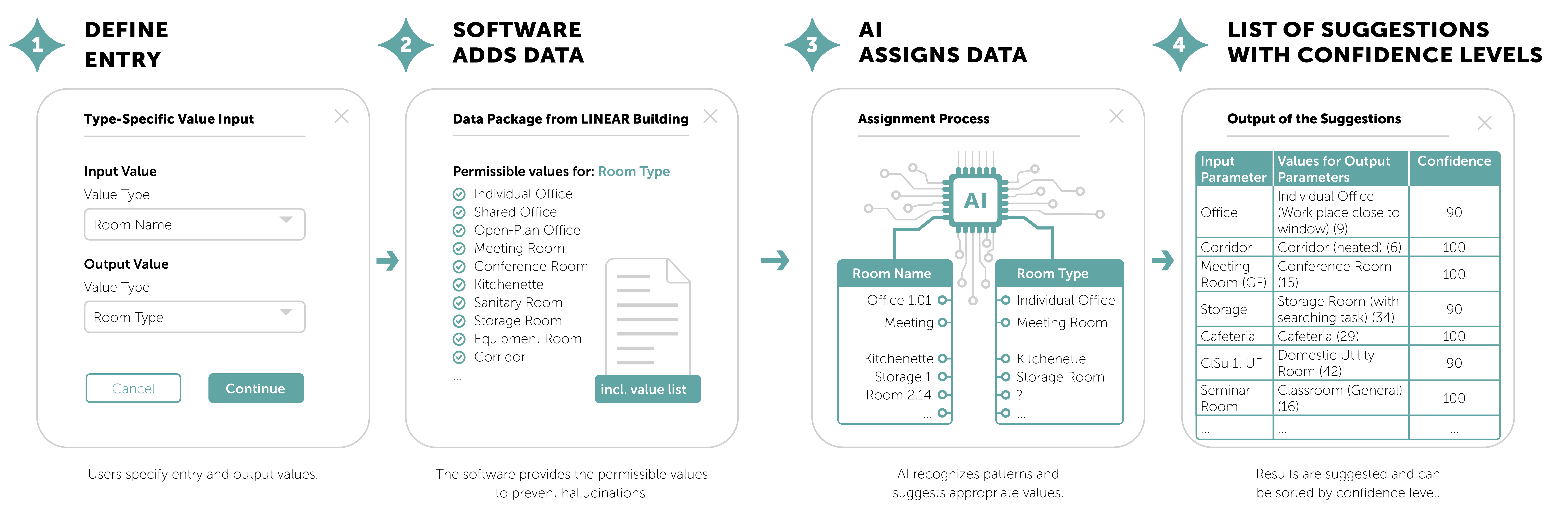
Of course, there are also obstacles when it comes to AI. An ambiguous term, such as “room,” can refer to a completely different room type in an office complex than it does in a hotel. And “office” doesn’t yet reveal whether it refers to a one-person or group office. In both cases, however, AI can lend a helping hand: In the first case, you add an optional prompt, such as: "This building is a hotel." In the second case, the "room area" is an additional input parameter for the "room name". From this, the AI can determine for how many people the room is dimensioned.

Click on the overview on the left to enlarge it.
AI Assistance in Finding a Room
The “AI Room Filter” function is explicitly not intended to replace simple, deterministic filters - such as searches for names, errors, room sizes, or other value ranges. That would be a waste of resources as well as inefficient: A prompt like “Search for all rooms larger than 100 m²” simply takes longer than entering “>100” in the room size filter field.
This feature really shines in situations where soft criteria, pattern recognition, or the simultaneous incorporation of multiple room data sets are required - filters that are much easier to implement that way or could not be implemented otherwise. Here are a few examples:
- “Rooms whose room names contain typos”
- “Rooms whose room heating load does not match the room type (Hospital)”
- "Rooms that may have too few electrical outlets"
These are filter “shortcuts” that may not yield 100 percent accurate results and that - with significantly more effort - could also be solved more precisely using deterministic methods. But it is precisely the simplicity of the application that ensures that inconsistencies are sought out and found in the first place - inconsistencies that might otherwise have been overlooked.
How does that work in detail?
The AI filter saves the user time in two steps. First, the function uses the prompt to determine what information is actually needed. When determining the heating load, the specific heating load (W/m²), the absolute room heating load, the room type, the room size, and the type of ventilation can all play a role. As a first step, the AI is provided with all possible parameter names and their meaning and is asked to make a meaningful selection for filtering. The actual room data is not transferred until the second step, and the actual filtering takes place based on this data.
Is all of this “safe”?
The answer is a clear “yes and no.” That said, the share of “no” is very low when it comes to data security.
LINEAR Building does not, on its own, provide the AI models with any information about the project itself (name, location, building owner, building type, etc.). All information about the building must therefore be "additionally prompted" (for example, "This building is a hospital"). The model receives only room data. However, if room names or room sizes hide information that must not leave the premises, locally hosted AI instances should be used. These aren't (yet) as powerful, but they are entirely under our own control.
When it comes to reliability in the sense of the accuracy of the results, greater care is required - as explained at the beginning. AI systems cannot replace expertise and professional experience. AI suggestions should never be applied without review.

A Look into the Future
Of course, this is by no means the end of AI applications in LINEAR software. We have implemented the first obvious applications in LINEAR Building's new Room Data Sheet module and are looking forward to hearing feedback from our users.
Our understanding of the data, its significance, and its interrelationships will open up even more opportunities in the future. The next logical step is the extension of AI functionality to the model platforms. There, too, it makes sense to simplify data entry and make the search and filter functions more intelligent -especially since these are often inadequately implemented in the native platforms.
A glance at our workbench shows that this step is more than just a declaration of intent:
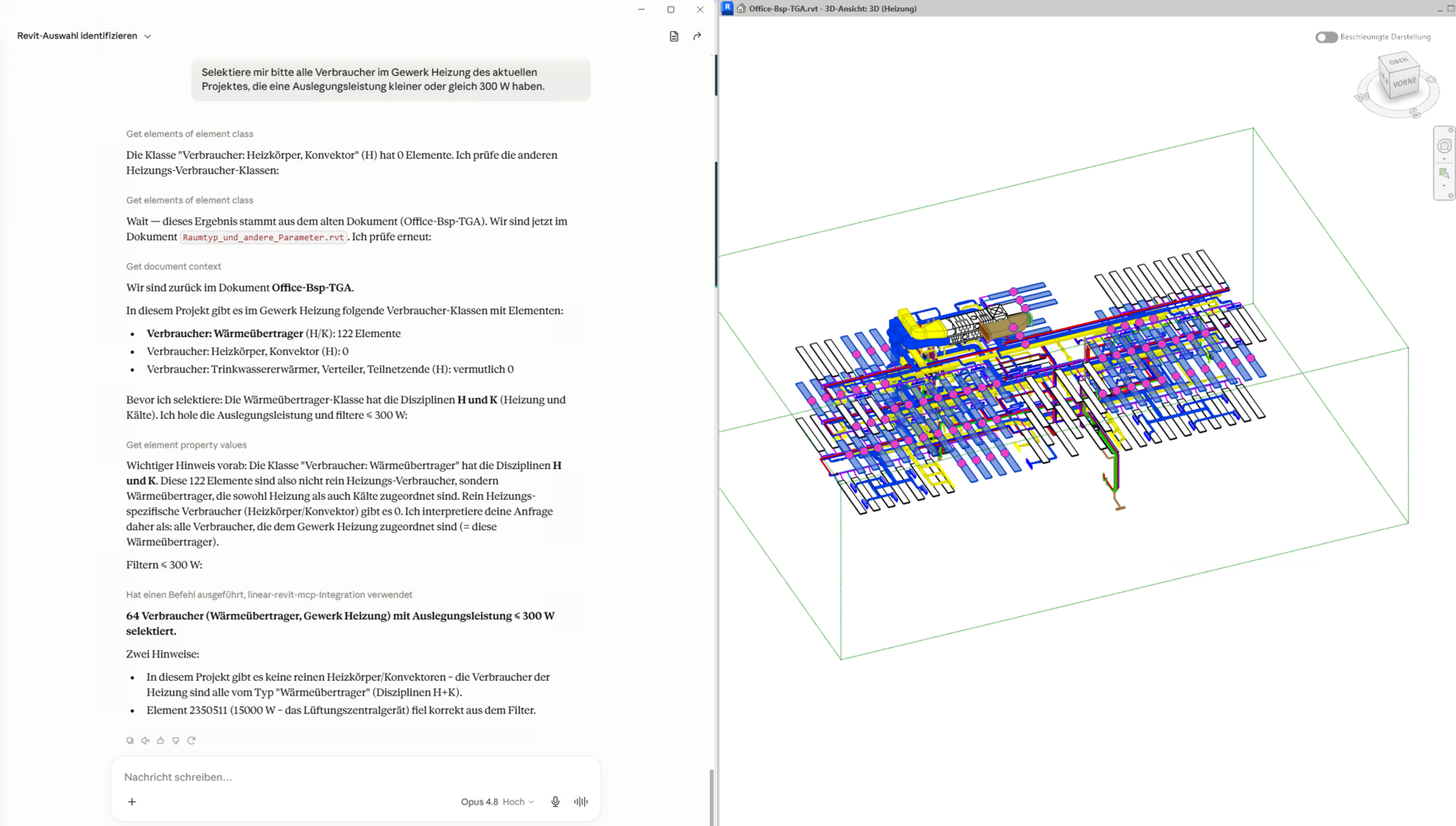
We have already built a prototype of our own MCP server and attached it to the AI "Claude" as an example. The test of this prototype has already yielded promising results. Two examples from the real-world model illustrate where its true strength lies.
In the first case, the prompt basically reads: "Select all appliances in the heating system that have a design capacity of ≤ 300 W." To solve this correctly, the system needs to know much more than the prompt explicitly states: Which element classes are actually considered “appliances” so that they can be assigned to the disciplines heating and cooling, in which parameter the design capacity is specified, and that a central ventilation unit with 15,000 W should not be included in the result. It is precisely this contextual knowledge that the LINEAR MCP server provides to the AI model; the AI simply translates the natural-language intent into the appropriate query.
In the second case, the issue is a seemingly simple question: "How much usable area is available in the building - excluding circulation areas and technical areas?" Here, too, the actual intelligence does not lie in the language model, but in the stored knowledge about which room types are classified as circulation areas (such as corridors) and which as technical areas (servers, shafts, elevators, staircases), and how the effective area is calculated based on this information. The language model formulates the question, and LINEAR provides the technically correct assignment.
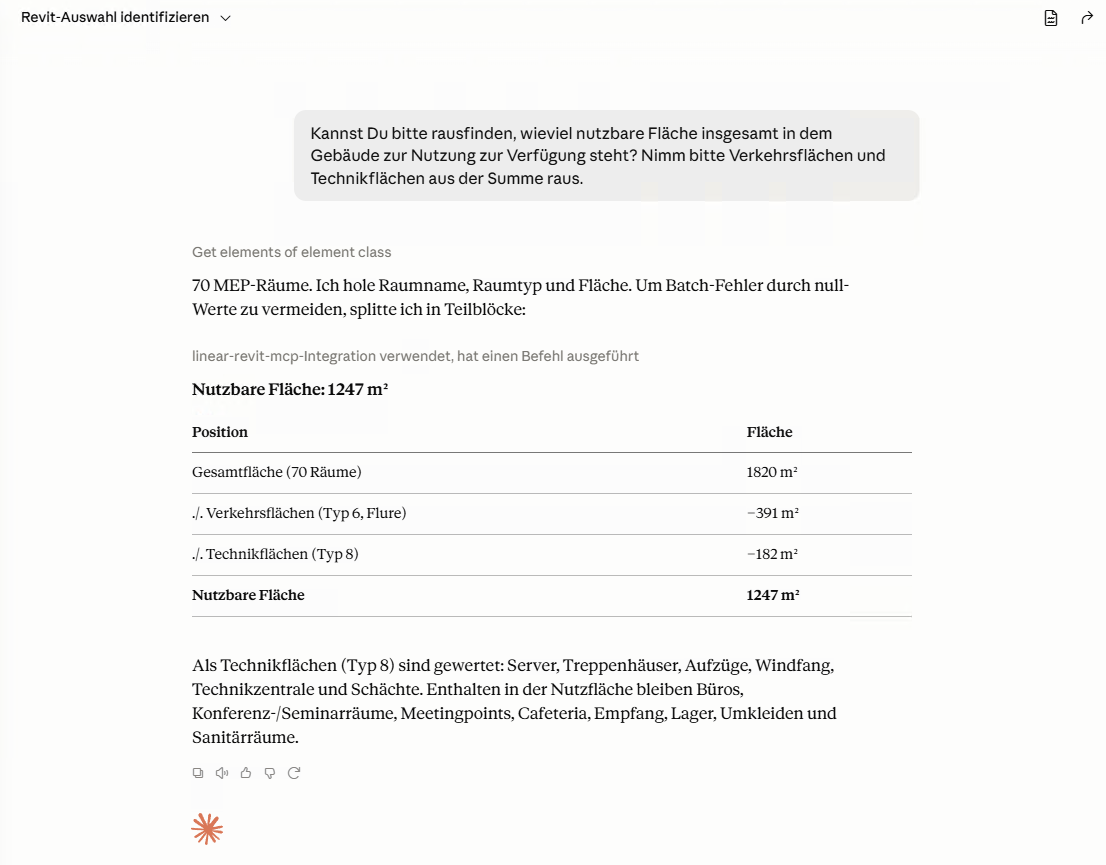
In both cases, the same principle applies: AI serves as the linguistic interface, but the results only become reliable through the combination of structured planning data with the language model's knowledge of the specific application domain.
Whether these functions will also be available to Autodesk Assistant in the future via MCP server extensions depends on Autodesk and their strategy. We are not dependent on it.
After the initial tests, one thing quickly becomes clear: A purely chatbot-like UI is useful if you want to convert user intent into automated actions. Analyses that used to require manual work or coding are suddenly as easy as delegating them to a hardworking - but not always reliable - employee. It is therefore advisable to assign only those tasks that you can evaluate much more quickly than you can complete them yourself.
For many planning tasks, however, conventional approaches remain the method of choice. When it comes to technical calculations, you don't want a language model to spend hours muttering numbers until the results look plausible and are then hopefully correct. There are also better ways to submit constructive tasks than using the chat. That's what the mouse was invented for decades ago - it handles this task well and, thanks to human expertise, works much faster and more precisely than a language model ever could. Despite all our enthusiasm, it therefore remains our task to continue developing both worlds: Both the new AI-powered tools and the tried-and-true ones, which are simply the better choice for many tasks and will remain so for the foreseeable future.
A Wide Field - with People in Control
The functions presented here are just a small sample of what AI can do in the day-to-day operations of engineering and design firms. Beyond its specific application in planning software, a wide range of possibilities opens up: From assisting with recurring tasks, to researching standards and technical regulations, to creating documentation or analyzing large amounts of data that would be nearly impossible to handle manually. Wherever patterns need to be identified, connections made, or time-consuming, tedious work handled, AI can take the burden off experts. This leaves more time for what truly requires professional expertise: planning, evaluating, and making decisions. However, even a rough overview of this topic would go far beyond the scope of this articles.
The functions available today are a start, not the target. One thing, however, will not change: a conscious, critical approach to these tools remains crucial. AI can shorten the ways and set the direction, but humans must still take responsibility for the result.
Model Context Protocol (MCP)
MCP is an open standard that allows an AI model to communicate with external tools and data sources.
The basic idea is simple: Instead of programming a separate, customized interface for every AI and every application, all parties involved speak the same “language.” Three terms are central here:
1. MCP-Client
The application that contains the AI model and connects to one or more MCP servers. In the case of Revit, this is the Autodesk Assistant (or, with the help of external connections, other applications as well, such as Claude Desktop).
2. Tool
A specific function that the AI Model can call - such as “Request elements” or “Edit parameters.” Each tool must have a description that is visible to users (name, purpose, required entries, output format). It is this step that makes the tool for the AI model discoverable and ensures it can be called correctly.
3. MCP Server
The program that bundles one or more tools, reports their availability, accepts calls, and applies the underlying function.
The term “server” refers only to the role, not the structure: While an MCP server can be a standalone network service, it can also simply be a local module or program library that is integrated directly into the application along with the tools.
In summary, it can be stated that:
AI is increasingly finding its way into building services engineering and will play a lasting role in that field. The current focus is on establishing the technical prerequisites for integration, developing initial applications, and testing them in the field. The key is to distinguish between what is “feasible” and what is “reasonable,” and, building on that, to provide verifiable solutions. LINEAR will actively help shape this development, always striking a balance between technical expertise and practical benefits in close dialog with our customers.