You are here:
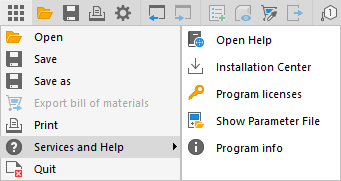
| Menu item | Description |
|---|---|
| Open Help |
Opens the help, where you can find instructions for standard tasks and information about the program interface. |
| Installation Center |
Opens the LINEAR Installation Center, where you can install software updates, hotfixes and manufacturer data sets. In addition, you can download current sample projects for all supported platforms. |
| Program licenses |
Opens the Program licenses dialog, in which you can activate or deactivate licensed modules for your desktop. |
| Show Parameter File | Opens the directory in the file explorer in which the shared parameter file is stored. |
| Program info |
Opens the Program Info dialog, in which the current version of the software, currently loaded modules and any user adjustments made are displayed. If you wish, you can copy this program information to the clipboard by clicking on it. Furthermore, the contact information for LINEAR is displayed and you can check the third-party licenses via the dialog. |