With the help of these dialogs you can copy the contents (symbols and lines) of pipe runs or storeys and paste them into other pipe runs or storeys. Copied radiators are then displayed in the storey overview of the Radiators module.
You are here:
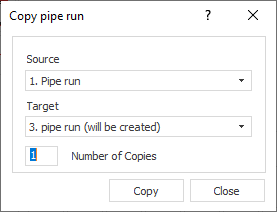
Source
Drop-down list to specify the pipe run or storey content to be copied.
Target
Drop-down list for specifying the target pipe run or target storey. Contents of already existing pipe runs and storeys will be overwritten during copying.
Number of copies: Determines how many copies are created. If the number of copies exceeds the number of existing pipe runs or storeys, they will be created automatically.