You are here:
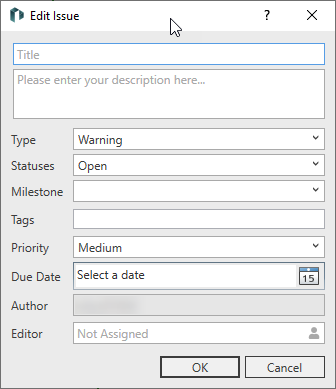
Text fields
|
Text field |
Content |
|---|---|
|
Title |
The title of the issue. Displayed in the issue list within the Issue section. |
|
Description |
Description of the contents of the issue. Displayed in the Issue section. |
|
Type |
Categorizes issues into weighting levels. You can choose between Note, Warning and Error. Types can be renamed and added in the options. |
|
Status |
Categorizes issues by degree of processing. You can choose between Proposal, Open, In Progress, Rejected, Accepted and Closed by default. Statuses can be renamed and added in the options. |
|
Milestone |
Free text field. Specify the milestone up to which the report is to be processed. Once milestones have been entered, they can be selected from the drop-down list in all other reports. |
|
Tags |
You can attach keywords to an issue. The entry of a keyword must be confirmed with Enter. Tags can be used for filtering. |
|
Priority |
The priority of the issue. Priorities can be extended and renamed in the options. |
|
Due date |
Concrete date on which the issue is to be processed. |
|
Author |
Author of the issue. |
|
Editor |
Person who should edit the issue. |