-
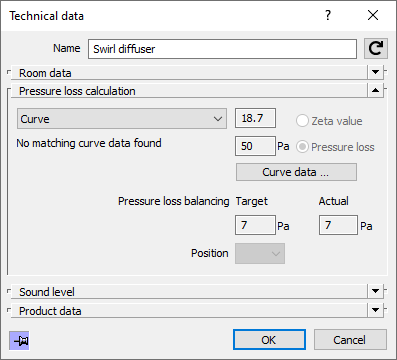
Select Curve from the drop-down list of the Pressure Loss section in the Technical Data dialog.
The Curve Data ... button becomes active.
-
Click on the Curve Data ... button.
The Curve Data dialog opens.
-
Use the drop-down lists Manufacturer, Model Series, Nominal Diameter and, if applicable, Damper Position to select the desired variant of the ventilation component.
The pressure loss data is displayed both in the table and as a curve diagram in the dialog.
-
Click OK to confirm the selection of the data for the ventilation component.
The program will prompt whether the pressure loss data should be assigned to the selected component only or to all components of the same type.
-
In the query of the program, select whether the pressure loss data should be assigned only to the selected or to all ventilation components of the same type.
You have assigned predefined pressure loss curve data to one or more ventilation components.