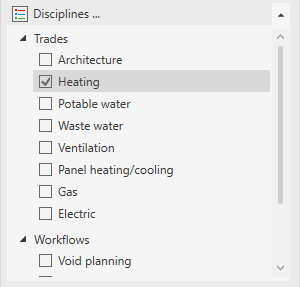
In this area you control the selection and activation of disciplines as well as the visibility of the various element categories in the individual disciplines.
You are here:
Disciplines ...
Opens the Disciplines dialog, where you specify, among other things, which disciplines are displayed in the control board. In the dialog you can also edit the names or abbreviations of disciplines, and create new disciplines by copying existing disciplines. Newly created disciplines contain the same system classes and properties as the disciplines they were copied from.
Disciplines section
The selection of the storey fulfills the following tasks:
-
Provision of the appropriate views in the project tab
-
Provision of the appropriate functions in the construction tab
-
Provision of the appropriate system classes in the construction tab
-
Provision of the appropriate libraries in the library tab
-
Visibility control of pipes, ducts, components and architecture in the model
The software distinguishes between selecting a building part, storey or discipline (marked in grey) and activating the check box. The checkbox controls the visibility of the elements of the discipline in the current view. Selecting a discipline by clicking in its row makes the functions, views, system classes, and libraries of that discipline available on the corresponding tabs of the LINEAR Control Board.
|
Symbol |
Function |
|---|---|
  |
Expand and collapse the lists. |
|
|
When you activate the checkbox of a discipline, the discipline is added to the active view and all elements of this discipline become visible in the view, unless categories of elements have been previously hidden within this discipline. If you deactivate the check box for a discipline, all elements of this discipline are hidden. |
|
|
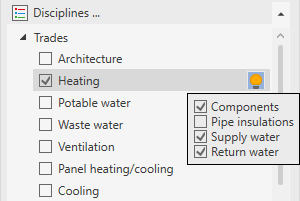
When the cursor is hovered over a discipline, the button appears, allowing you to show or hide different categories of elements in the active view:
 |


