You are here:
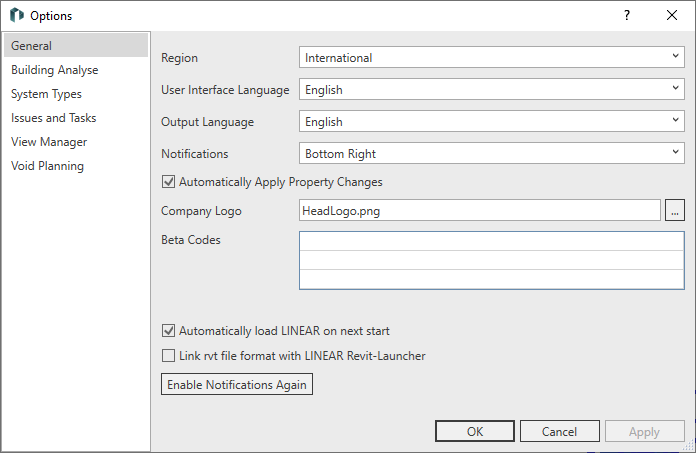
Region
The selection in this field determines the interface and output language. The selection in this field determines the applicable norms for calculations.
User interface language
Select the language of the program interface regardless of the selected Region.
Output language
Select the language for the output, independently of the selection for Region and User interface language. The output language is used when printing and exporting component lists and when transferring the building model to LINEAR Building.
Notifications
Defines where help for the use of individual functions should appear in the drawing area.
Automatically apply property changes
Enabled: Changes in the LINEAR property window are applied directly by moving the mouse from the property window without having to click the Apply button.
Disabled: Changes in the LINEAR property window are not applied until you click the Apply button or click anywhere else in the program.
Restart Revit to apply the setting made in the LINEAR options to the Revit properties window.
Company logo
After clicking  , select a graphic in BMP format.
Beta codes
Enter beta codes here. In exceptional cases, you will receive a beta code for testing purposes that unlocks certain functions of a upcoming release. After entering a beta code, it is usually necessary to restart the program.
LINEAR load automatically at the next start
Enabled: Opening a Revit instance automatically loads the LINEAR software. It is no longer necessary to launch Revit from the LINEAR app launcher and then open files in to work with the LINEAR software. Double-clicking the file is sufficient.
Disabled: The LINEAR software is not loaded automatically. To start Revit with the LINEAR software, Revit has to be started via the LINEAR app launcher and then the file to be edited has to be opened in Revit.
Link rvt-file format with LINEAR app launcher
Enabled: After double-clicking a rvt-file, the LINEAR App Launcher reads the version the file was created or last saved with and opens the file with this version, if the version is installed. If the determined version of Revit is not installed, the file opens with the latest version of Revit. With this setting you can prevent models of older Revit versions from having to be updated before opening, or from not opening at all when opened with older versions of Revit.
If, for example, you consciously work with older versions in projects, this function prevents your model from being accidentally opened, updated and saved with a newer Revit version.
Disabled: Double-clicking an rvt file to open it will automatically open the file with the latest installed version of Revit. If the file was created or saved with an older version of Revit, the model needs to be updated to the new version of Revit.