-
Click on Update
 .
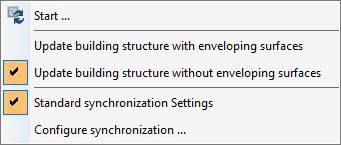
.The following context menu opens:
-
Specify whether the building structure should be updated with or without enveloping surfaces from the CAD program by activating the respective option.
The option Update Building Structure without Enveloping Surfaces is only available if the building was detected without enveloping surfaces. After an update with the Update Building Structure with Enveloping Surfaces option, the Update Building Structure without Enveloping Surfaces option is no longer available.
-
If necessary, select the synchronization settings to be used or adjust the synchronization settings via Configure Synchronization ....
-
Click on Start ....
The building structure is updated according to the selected options with or without enveloping surfaces and taking into account the synchronization settings.
Your project in LINEAR Building is updated and corresponds to the status of the CAD program.