You are here:
Calculation Method
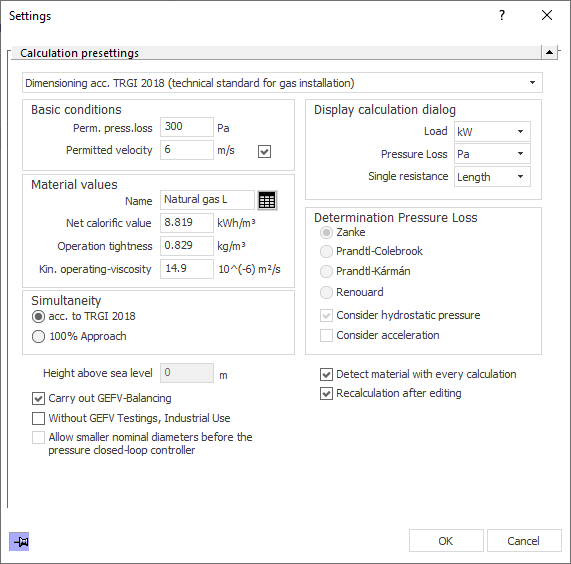
Select the desired Calculation method using the drop-down list. Depending on the selected method, different settings are at your disposal.
The following calculation method are available:
- TRGI 2008
- TRGI 2018
- ÖVGW G11
- TRF 2012
Basic conditions
Enter the permitted pressure loss and the permitted velocity. To change the permitted velocity, activate the checkbox.
Display Calculation Dialog
Enter the units to be used for displaying load, pressure loss and single resistance. For natural gases, the load is usually used in kW, for liquid gas, for example, in kg/h.
Material values
When Dimensioning acc. to TRGI 2018, the gas type can be selected or freely defined by entering the material values. If you enter material values in this dialog, the input is saved with the project. If you create the new gas type in the dialog Material values, it will also be available for other projects.
|
Element |
Description |
|---|---|
|
Name |
When Dimensioning acc. to TRGI 2018, the name can be changed. The input is saved with the project. |
 Material value table |
Opens the Material values dialog when Dimensioning acc. to TRGI 2018, in which you can select a different gas type and create additional gas types. If you create a gas type in the dialog Material values, it will also be available for other projects. |
|
Net calorific value |
Display of the net calorific value of the selected type of gas. When Dimensioning acc. to TRGI 2018, the net calorific value can be changed. The input is saved with the project. |
|
Operation tightness |
Display of operation tightness of the selected gas type. When Dimensioning acc. to TRGI 2018, the operation tightness can be changed. The input is saved with the project. |
|
kin. operating viscosity |
Display of kinematic operating viscosity of the selected gas type. When Dimensioning acc. to TRGI 2018, the kinematic operating viscosity can be changed. The input is saved with the project. |
Determination Pressure loss
Depending on the selected calculation method, different setting options are available in the Pressure Loss Calculation section.
|
Element |
Description |
|---|---|
|
Zanke Prandtl-Colebrook Prandtl-Kármán Renouard |
Select the method to determine pressure loss. |
|
Consider hydrostatic pressure |
Enabled: Pressure losses or pressure recoveries due to gravitational forces are also considered during dimensioning. If the gas used is lighter than air and the consumers are positioned higher than the house service connection, pressure recovery is possible and the pipes will be dimensioned smaller accordingly. If the gas used is heavier than air and the consumers are positioned higher than the house service connection, this height difference must be overcome additionally. |
|
Consider acceleration |
Enabled: Considers the dynamic pressure change per pipe section caused by changes of volume flow rates and dimensions over the course of a flow path. |
Simultaneity
The simultaneity of consumers in flow paths can be set according to the rules of the TRGI 2008/TRGI 2012 or according to a 100 %-approach.
|
Element |
Description |
|---|---|
|
acc. to TRGI 2008/TRF 2012 |
Enabled: The simultaneity of consumers in flow paths will automatically be set according to the rules of TRGI 2008/TRF 2012. |
|
100 % approach / user defined |
Enabled: A simultaneity of 100 % is initially assumed for all consumers in flow paths. In the component data of the individual consumers, you can define individual specifications for the respective component. |
other calculation presettings
The setting options described below are used, among other things, to optimize the processing time for large networks.
|
Element |
Description |
|---|---|
|
Height above sea level or height above Adriatic Sea |
Enter the height level of the building. For the dimensioning according to ÖVGW G11, the Height above Adria is specified instead of the Height above NN. |
|
Execute GEFV-balancing |
Enabled: GEVF-balancing is performed after each calculation. Disabled: Calculation is carried out without GEVF-balancing, which can be helpful for intermediate results. If a GEVF balancing is prescribed in the selected calculation method, a note is output. |
|
without GEFV testings |
Enabled: Calculation is carried out without GEFV testings. A note is output in the printout that the GEFV testings are deactivated. |
|
Allow smaller nominal diameters before the pressure closed-loop controller |
Enabled: During dimensioning pipes after the pressure closed-loop controller are dimensioned decreasingly but pipes before the closed pressure closed-loop controller are allowed to be smaller without their nominal diameter being regarded the maximum for the entire system. Disabled: All pipes are dimensioned decreasingly. |
|
Detect material with every calculation |
Enabled: Material for creating the parts list is detected with every calculation. Disabled: Material for creating the parts list is not detected with every calculation. For large project where changes in material are not to be expected, this can shorten calculation time. |
|
Recalculation after editing |
Recalculates after editing components or sections. |