A hydrant can be place and connected like a component (WC, wash stand, etc.).
You are here:
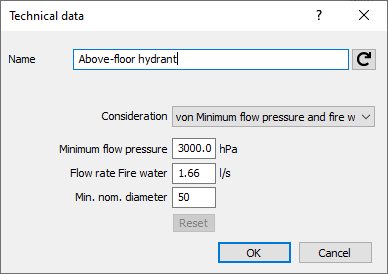
Name
Specifies the name of the component. You can modify the name. Clicking  restores the default setting.
Consideration
Use the drop-down list to specify how the hydrant should be included in the calculation.
|
Option |
Description |
|---|---|
|
Consideration of minimum flow pressure |
The geodetic pressure loss is calculated up to the hydrant. |
|
Consideration of minimum flow pressure and fire water flow rate |
Allows you to consider not only the minimum flow pressure but also the fire water flow rate in the design. |
|
do not consider |
The hydrant is not included in the calculation. |
Minimum Flow Pressure: Enter the minimum flow pressure in hPa. The consumers are generally predefined with expedient values.
Flow Rate Fire Water: In case of Consideration of Minimum Flow Pressure and Fire Water Flow Rate, specify the fire water flow rate to be considered in the dimensioning in l/s.
Min. Nominal Diameter: In this field, specify the minimum size of the wall hydrant. In the calculation, it is thus not possible to select a smaller dimension.
Reset Settings: If you changed the values manually, you can use the Reset Settings button to reset the values to the default data.