You are here:
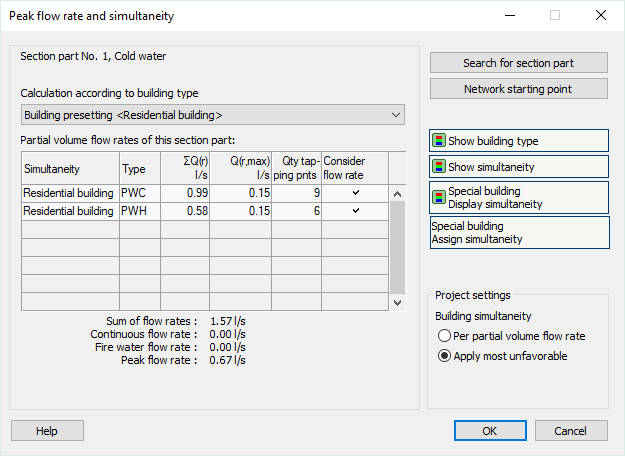
Pipe/duct section No. x
Shows the selected pipe section. If you open this dialog for the first time, this will be pipe section No. 1 at the initial component.
Calculation according to building type
Shows the building type of the selected pipe section. When opening the dialog for the first time, the building type set in the settings is transferred to all pipe sections and displayed in Building presetting <building type>. The building type can be changed for each pipe section.
Special building
If you select the building type Special building, the following dialog allows you to enter the simultaneity percentage.
Partial volume flow rates of this pipe section
This table displays the partial volume flow rates of the selected pipe section. They are displayed sorted by building type and by cold- and hot water.
Sum of flow rates, Continuous flow rate, Fire water flow rate, Peak flow rate
The values of the selected pipe section are shown. The peak flow rate results from the sum of flow rates and the simultaneity.
Search for pipe section
After clicking this button select the pipe section in your model whose properties are to be displayed. You can select the building type for this pipe section subsequently.
Network starting point
Selects pipe section No. 1 at the initial component to show its properties.
Show building type
Displays the assigned building type in the model by coloring the pipe sections.
Show simultaneity
Displays the assigned simultaneities type in the model by coloring the pipe sections.
Special building Display simultaneity
For pipe sections that have been assigned the building type Special building, you can use this button to display the assigned simultaneity values colored in the pipe sections of the model. Simultaneities coming from other building types are not displayed and shown in gray saying not available.
Special building Assign simultaneity
Use this function to freely assign simultaneity values to pipe sections that carry the building type Special building. Assignment takes place for cold- and hot water separately.
Project settings simultaneity
These settings are used if different building types have been assigned within the same pipe network. If you change these settings, the display for Peak flow rate shows the effect of the change for the pipe network.
Per partial volume flow rate: Meaningful setting for starkly differing simultaneities to avoid large nominal diameters.
Apply most unfavorable: Meaningful setting for similar simultaneities to avoid large nominal diameters.