-
In the section Pipe sections, select the desired pipe section.
-
Click on Edit….
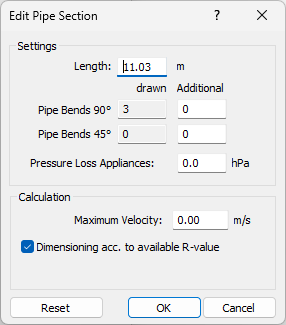
The dialog Edit Pipe/Duct Section opens.
-
Enter an individual value that differs from the entered dimension in the field Length, for example to compensate for design tolerances.
-
If necessary, enter additional 90° and/or 45° bends.
-
If necessary, enter the total additional pressure loss due to appliances in the Pressure Loss Appliances field.
-
If necessary, specify a maximum velocity for the pipe or duct section that differs from the global setting.
-
If necessary, disable the Dimensioning according to available R-Value checkbox so that the section is only dimensioned using the maximum velocity and the available R-values are not taken into account during dimensioning.
-
Confirm the changes by clicking OK.
The adjusted data has been assigned to the selected pipe section and is used in the calculation.