You are here:
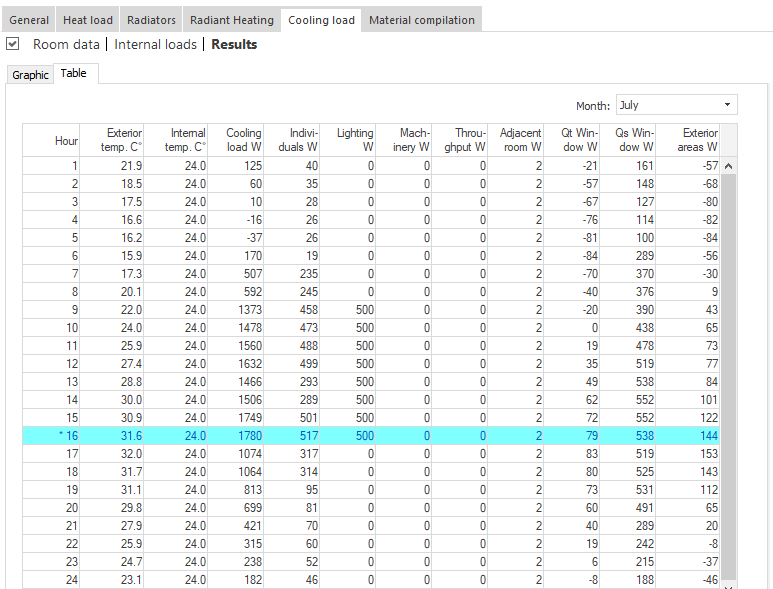
At room level, depicts the results of the cooling load calculation according to the short procedure in tabular form.
Month: Selection of the design month for which the results are to be displayed.
|
Column |
Description |
|---|---|
|
Hour |
Daily time of the design day in the selected month. |
|
Outside Air Temperature °C |
Daily pattern of the outside air temperature at the selected project site. |
|
Inside Air Temperature °C |
Daily pattern of the inside air temperature of the currently selected room. |
|
Cooling Load W |
Daily pattern of the total cooling load in the currently selected room. |
|
Individuals W |
Internal load caused by individuals. |
|
Lighting W |
Internal load caused by lighting. |
|
Machinery W |
Internal load caused by machinery. |
|
Material Throughput W |
Internal load caused by material throughput. |
|
Adjacent Room W |
Cooling load percentage of the heat gains and heat losses at adjacent rooms. |
|
Qt Windows W |
Cooling load percentage of the heat gains caused by transmission at windows. |
|
Qs Windows W |
Cooling load percentage of the heat gains caused by solar radiation through windows. |
|
Outside Surface W |
Cooling load percentage of the heat gains caused by solar radiation on exterior areas. |