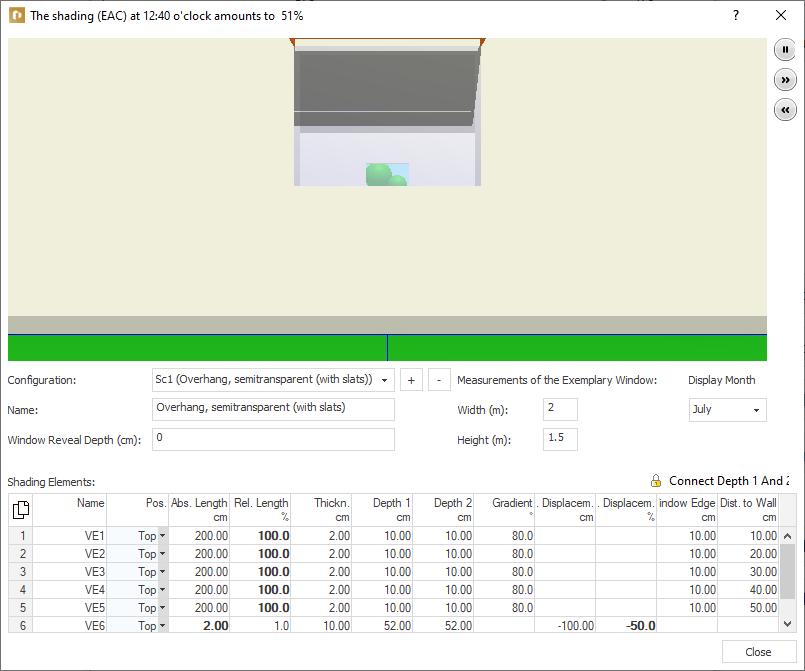
-
Click in the Calculation Data section under EAC (only CDD/CDP) on
 .
.The Shading (EAC) (...) dialog opens.
-
Click beside the Configuration dropdown list on
 and give the configuration a Designation.
 -
In the Shading Elements table, click in an empty line to create the first shading element.
-
In the Position column, select the position of the element.
-
In the Length Relative % column, enter in percent how long the shading element is to be relative to the window width.
125% relative width for a 1m wide window will be 1.25m.
-
In the Depth 1 column, enter the depth of the shading element.
By default, a shading element has the same depth at both ends. Click on the lock in front of Connect Depth 1 and Depth 2 to be able to enter different values.
-
In the Window Distance column, enter the distance of the shading element relative to the horizontal or vertical window edge.
-
Positive values place the element outside the window, negative values place the element above the glass surface.
-
Add the remaining parameters.
-
Repeat the process for all the window’s shading elements.
The shading configuration is set as desired and can be used in the window configuration.